Ask five managers what a risk register is and you will get five answers: a spreadsheet the auditors want, a list of things that might go wrong, the risk team's file, a project log, or "that document we update in December". All five describe the format. None explains what the register is for, which is why so many of them are complete on paper and ignored in practice.
This guide explains what a risk register is, where the term comes from, what it should contain, who owns it, how it differs from a risk management plan and other look-alike documents, and how to build one in seven steps. It is written for anyone starting a register from scratch or inheriting one that nobody trusts. If you already know the basics and want the spreadsheet itself, go straight to our risk register template with Excel formulas and examples.
What is a risk register? (Quick answer)
A risk register is the central record of an organisation's identified risks. For each risk it records what could happen and why, who owns it, how likely and how serious it is, what is being done about it, and how much risk remains. Managers use it to decide priorities, track treatment and show that risks are being managed, not just discussed.
Risk register meaning and definition
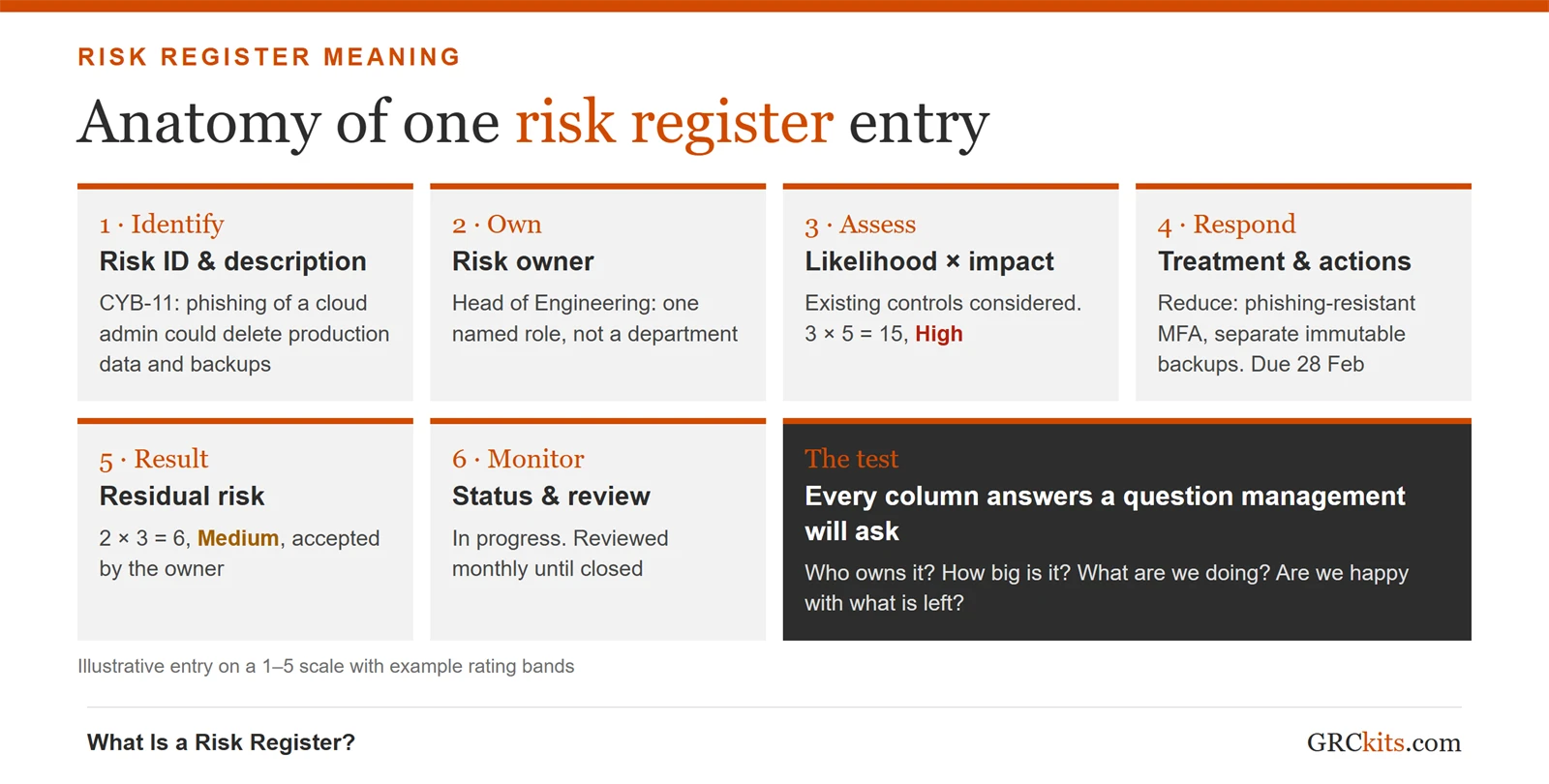
In plain terms, a risk register is a list, but a list with decisions attached. Each line is one risk, and every column answers a question management will eventually ask: "Who is responsible for this?", "How bad could it get?", "What are we doing about it?" and "Are we comfortable with what is left?"
The formal definitions say much the same thing:
ISO Guide 73:2009, the international risk management vocabulary, defined a risk register as a "record of information about identified risks" and noted that "risk log" is sometimes used for the same thing. Guide 73 has since been replaced by ISO 31073:2022 Risk management — Vocabulary.
NIST gives two definitions in its glossary: "a repository of risk information including the data understood about risks over time", and "a central record of current risks, and related information, for a given scope or organization", where current risks include both accepted risks and risks with a planned mitigation path.
Two words in those definitions do most of the work. Identified means the register only holds what someone has found and written down; it is never proof that nothing else exists. Over time means a register is a living record. A file that has not changed since the last audit is a snapshot of old risks, not a register.
One more point that surprises many readers: ISO 31000:2018 defines risk as the "effect of uncertainty on objectives", and that effect can be positive or negative. Most registers record threats only, which is fine, but project and enterprise registers can also record opportunities and how the organisation plans to take them.
What is the purpose of a risk register?
The purpose of a risk register is to turn risk management from a conversation into a set of owned, tracked decisions. In practice it does five jobs at once:
Memory. It keeps what the organisation knows about its risks in one place, so knowledge survives staff changes, reorganisations and the gap between annual assessments.
Prioritisation. Scores and ratings show which risks deserve money and attention first. Without them, the loudest risk in the room wins.
Accountability. Every risk has a named owner, and every action has an owner and a date. Vague shared ownership is where risks go to be forgotten.
Decision record. When management accepts a risk rather than treating it, the register shows who decided, when and on what basis. That protects the decision-maker as much as the organisation.
Evidence. Auditors, regulators, insurers and customers ask how risks are managed. A current register answers most of those questions in one document.
The second purpose is easy to miss: a register is a reporting source, not the report. Boards rarely want 200 rows. They want the top ten risks, the trend and the decisions needed, all of which are drawn from the register.
What does a risk register include?
A risk register includes, for each risk, an identifier, a description, an owner, an assessment of likelihood and impact, a rating, a treatment decision with actions, the residual risk, a status and review dates. Most registers add a category and the existing controls so the score reflects reality.
Element | The question it answers | Typical fields |
|---|---|---|
Identification | What could happen, and why? | Risk ID, category, description (cause, event, consequence), affected objective, asset or process |
Ownership | Who is accountable? | Risk owner, action owners |
Assessment | How big is it today? | Existing controls, likelihood, impact, score, rating |
Response | What are we doing about it? | Treatment option, actions, target dates, cost (optional) |
Result | What will be left, and is that acceptable? | Residual likelihood, impact and rating, acceptance by the owner |
Monitoring | Is this still current? | Status, trend, last review date, next review date, key risk indicator (optional) |
The quality of the description matters more than the number of columns. "Cyber attack" cannot be scored or treated. "Ransomware delivered by email could encrypt the file servers and stop order processing for several days" can. A simple test: if two people would score the risk very differently because they imagine different scenarios, the description is too vague.
For a full list of 18 fields with core and optional columns, see the risk register template guide.
Who owns and uses a risk register?
The organisation owns the register as a whole, but each risk in it is owned by one named person: the manager with authority over the process and budget the risk affects. Different roles use it in different ways, which maps neatly onto the IIA's Three Lines Model.
Role | What they do with the register |
|---|---|
Board or audit and risk committee | Sets risk appetite, reviews top risks and trends, challenges decisions to accept risk |
Senior management | Approves criteria, accepts residual risk above an agreed threshold, funds treatment |
Risk owners (first line) | Describe and score their risks, decide treatment, deliver actions, accept residual risk within their authority |
Risk or compliance function (second line) | Maintains the method, criteria and register format, challenges scores, consolidates reporting |
Internal audit (third line) | Gives independent assurance that the process works, and uses the register to plan audits |
A common mistake is naming a department, usually "IT", as owner of every technology risk. IT can implement controls, but it usually has no authority to accept a payment fraud risk on behalf of finance. Name the role that would answer for the consequence. Internal audit, in turn, should not own risks in the register it audits; it reads the register to build a risk-based internal audit plan.
Types of risk registers
The structure barely changes between types of risk register. What changes is the scope, the owner, the time horizon and the framework it reports against.
Type | Scope and typical risks | Usual owner | Common reference |
|---|---|---|---|
Enterprise (corporate) risk register | Strategic, financial, operational, legal and reputational risks across the organisation | Chief risk officer or risk function, reported to the board | ISO 31000, COSO ERM |
Project risk register | Risks to scope, schedule, cost and quality of one project; often includes opportunities | Project manager, with the sponsor | PMI's PMBOK Guide, PRINCE2 |
IT and cybersecurity risk register | Risks to systems, data and services: ransomware, access, suppliers, outages | CISO or head of IT, with business risk owners | NIST CSF 2.0, NIST IR 8286 |
Information security (ISMS) risk register | Risks within the ISMS scope, linked to treatment and the Statement of Applicability | ISMS manager, with named risk owners | ISO/IEC 27001:2022, ISO/IEC 27005:2022 |
Operational or departmental register | Day-to-day risks of one function, site or process | Department head | Internal risk policy |
Third-party risk register | Risks from suppliers, outsourcers and cloud providers | Procurement or vendor risk team | Internal policy, sector regulation |
These registers should connect rather than compete. NIST IR 8286 describes cybersecurity risk registers being aggregated into an enterprise risk register, and NIST IR 8286A Rev. 1 covers how to identify and estimate the cyber risks that feed it. The practical rule is simple: use the same scales, or document how one scale translates to the other, so that "High" means the same thing in every report the board reads.
Risk register vs risk management plan (and other look-alike documents)
A risk management plan describes how risk will be managed: the method, roles, scales, tools and reporting rhythm. A risk register records which risks exist and what is being done about each one. The plan is written once and revised occasionally; the register changes every time a risk does.
In project management the two come from different processes. In the PMBOK Guide's process model, the risk management plan is an output of planning risk management, while the risk register is first created when risks are identified and then updated through analysis, response planning and monitoring.
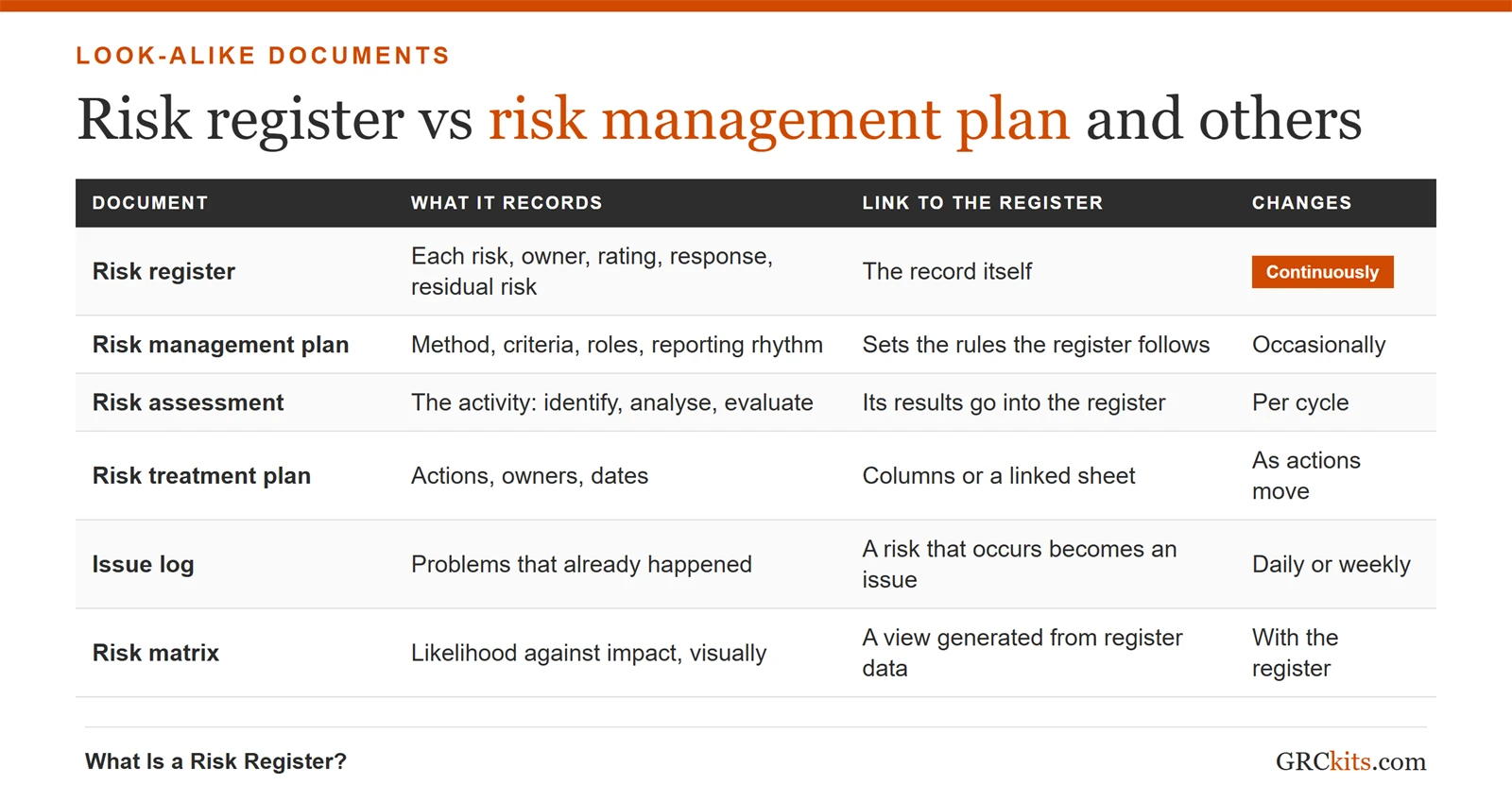
Document | What it is | How it relates to the register |
|---|---|---|
Risk management plan (or framework, policy, methodology) | The rules: method, criteria, roles, frequency | Sets the scales and process the register follows |
Risk assessment | The activity of identifying, analysing and evaluating risks | Its results are recorded in the register |
Risk treatment plan | The actions, owners and dates that reduce risk | Can be columns in the register or a linked sheet |
Issue log | Problems that have already happened | A risk that materialises becomes an issue; keep the two separate |
RAID log | Project log of risks, assumptions, issues and dependencies (some teams use actions and decisions) | Contains a project risk register as one section |
Risk matrix or heat map | A visual of likelihood against impact | A view generated from register data, not a separate record |
Risk profile | A summary of the organisation's risks for leadership | Drawn from one or more registers |
For ISO/IEC 27001 work there is one more link in the chain: risk treatment decisions in the register lead to the controls listed in the Statement of Applicability, and each SoA justification should trace back to a risk.
Where the risk register sits in the risk management process
The register is not a separate step. It is where every step of the risk management process leaves its output. ISO 31000:2018 describes the process as scope, context and criteria; risk assessment (identification, analysis, evaluation); risk treatment; and monitoring and review, all surrounded by communication and consultation, and recording and reporting. The register is the main tool for that last activity.
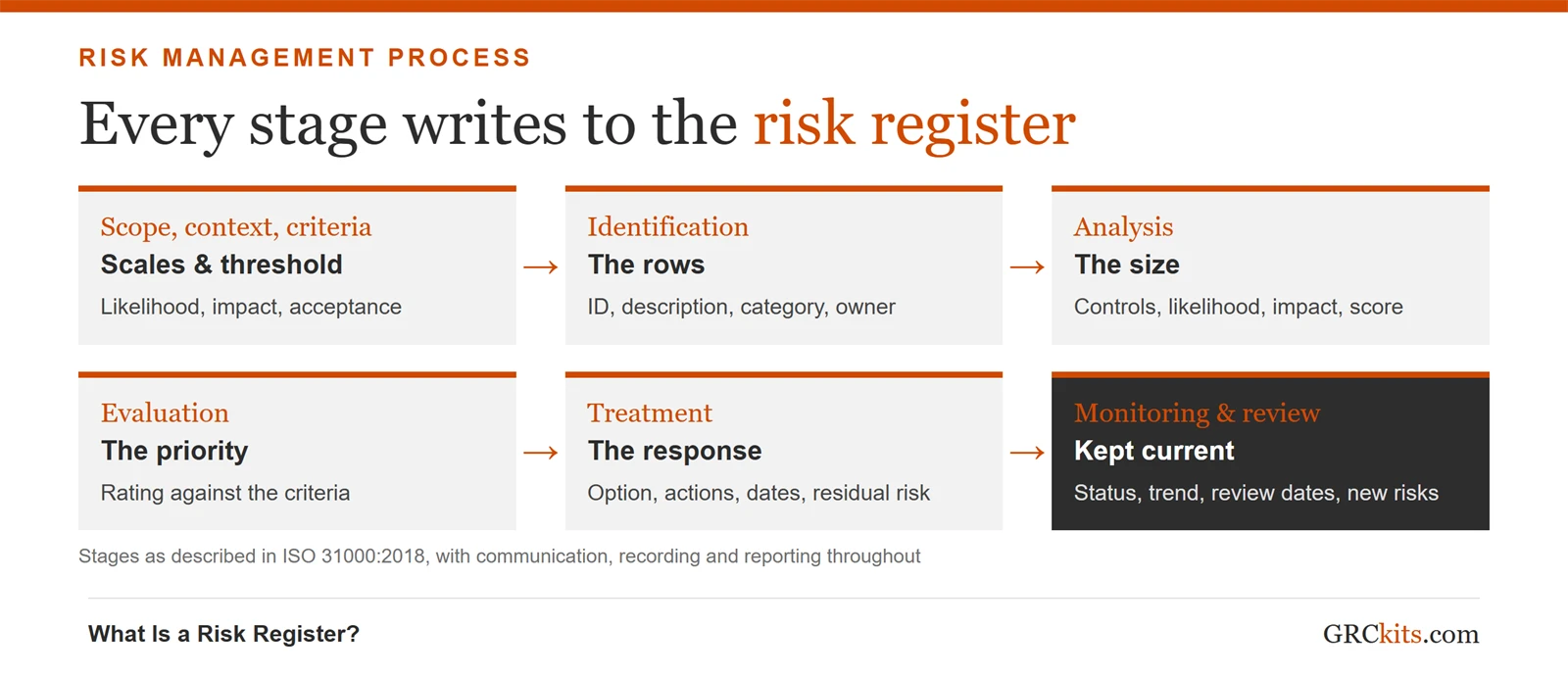
Scope, context and criteria set the scales and the acceptance threshold the register uses.
Identification adds the rows: risk ID, description, category, owner.
Analysis fills in existing controls, likelihood, impact and score.
Evaluation compares the score with the criteria and sets the rating and priority.
Treatment adds the option, actions, dates and residual risk.
Monitoring and review updates status, trend and review dates, and adds new risks.
How to build a risk register in 7 steps
Building a risk register takes seven steps: agree the criteria, fix the scope and format, identify risks, assign owners, assess them, decide treatment, and set a review rhythm. The order matters. Most failed registers skipped step 1 and started scoring before anyone agreed what "High" means.
Agree the risk criteria first. Write down the likelihood and impact scales, the rating bands, and who can accept which level of risk. Get them approved by management. ISO/IEC 27001:2022 clause 6.1.2, for example, requires information security risk criteria, including acceptance criteria, to be established before assessment.
Fix the scope and the format. Decide what the register covers (the whole organisation, one project, the ISMS scope) and which fields you need. Start with the core columns; you can add more later, but removing unused ones is harder. A spreadsheet is enough for most organisations starting out.
Identify risks from evidence, not only workshops. Use objectives and key processes as the starting point, then add incident history, audit findings, near misses, supplier issues and vulnerability scans. Workshops are useful, but on their own they record what people remember, not what happened.
Write each risk as cause, event and consequence, and name an owner. One risk per row, one owner per risk. The owner is a role with authority, not a department.
Assess likelihood and impact against the agreed criteria. Score the realistic scenario you have written, taking existing controls into account, and record the rating. Keep the reasoning short but visible, so a reviewer can follow it.
Decide the treatment and the residual risk. Choose to reduce, avoid, share or accept each risk. ISO/IEC 27005:2022 uses the terms modify, avoid, share and retain. Record the actions, owners and dates, then the expected residual rating and the owner's acceptance of it.
Set the review rhythm and the reporting. Review high risks more often than low ones, and update the register after incidents, major changes and new projects. Agree what goes to management and how often.
Want the formulas, drop-downs and a 5×5 heat map for steps 5 to 7? The risk register template guide walks through each one in Excel with a free sample workbook.
Risk register example: two completed entries
The two entries below show the same structure working for a business risk and a cybersecurity risk. Both are illustrative: the scores use a 1–5 scale and example bands, and your own values will depend on your criteria and controls.
Field | Business example | Cybersecurity example |
|---|---|---|
Risk ID | ENT-04 | CYB-11 |
Description | Loss of the largest customer (30% of revenue) at contract renewal, because of late deliveries, could cut annual revenue and force cost reductions | Compromise of a privileged cloud admin account through phishing could allow deletion of production data and backups held in the same account |
Category | Strategic / commercial | Information security / access |
Risk owner | Commercial Director | Head of Engineering |
Existing controls | Quarterly account reviews; delivery KPIs reported monthly | MFA by SMS; daily backups to the same cloud account |
Likelihood × impact | 3 × 5 = 15, High | 3 × 5 = 15, High |
Treatment | Reduce: delivery recovery plan, executive sponsor for the account, diversify pipeline | Reduce: phishing-resistant MFA for admins, separate backup account with immutable copies, quarterly restore test |
Action owner and date | Operations Director, 31 March | Cloud Platform Lead, 28 February |
Residual risk | 2 × 5 = 10, High (accepted by CEO) | 2 × 3 = 6, Medium (accepted by owner) |
Status and review | In progress; reviewed monthly | In progress; reviewed monthly until closed |
Notice what the business example shows: treatment can reduce likelihood without changing impact, and a residual "High" can still be a legitimate, recorded decision if the right person accepts it. A register is not supposed to make every risk green; it is supposed to make every remaining risk a conscious choice.
Risk register maturity: where is yours today?
Most organisations already have something called a risk register. The useful question is how mature it is. The four levels below are a practical self-assessment we use, not a formal model from any standard.
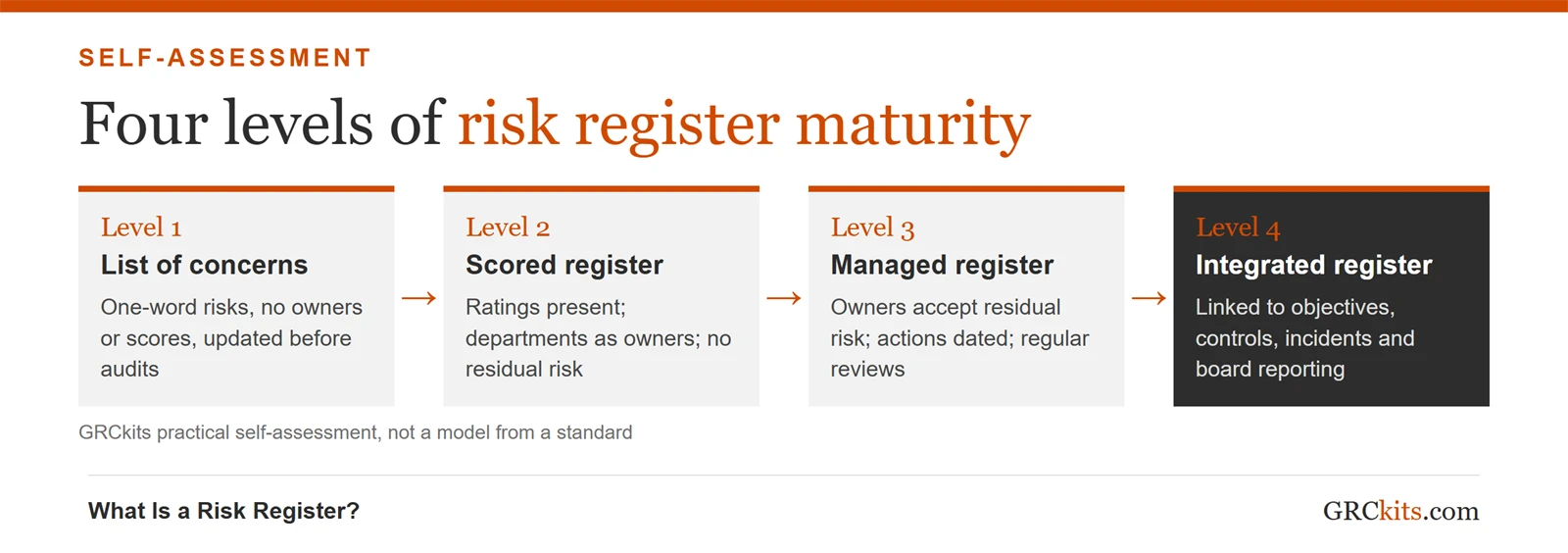
Level | What it looks like | Next move |
|---|---|---|
1. List of concerns | Risks written as single words, no scores or owners, updated before audits | Agree criteria and rewrite risks as scenarios |
2. Scored register | Likelihood, impact and rating present; owners are departments; no residual risk | Name role owners, add treatment and residual risk |
3. Managed register | Owners accept residual risk, actions tracked with dates, scheduled and event-driven reviews | Link to incidents, controls and key risk indicators |
4. Integrated register | Risks linked to objectives, controls, incidents and audit plans; feeds board reporting and budget decisions | Keep it lean; retire risks that no longer matter |
Common risk register mistakes (and a 10-point health check)
Risk registers rarely fail because of the template. They fail because of how they are used. Critics of risk registers make a fair point: a long, colourful list can give false confidence that risks are under control. The fixes below keep the register honest.
Our author's field notes in the risk register template guide describe the three findings that come up most often in audits: risks owned by "IT", residual risk with no sign-off, and registers updated only just before the audit. Run this health check on your own register:
Are the risk criteria written down, approved and dated?
Is every risk written as a scenario that two people would score the same way?
Does every risk have one named role as owner?
Do scores take existing controls into account, and is that rule applied consistently?
Does every risk above the acceptance threshold have a treatment decision?
Do actions have owners, dates and a status, and are overdue actions visible?
Is residual risk recorded and accepted by someone with authority to accept it?
Do review dates differ by risk, or does every row show the same date?
Have last year's incidents, new systems and new suppliers changed the register?
Can you produce a one-page summary for management from the register in minutes?
Fewer than seven "yes" answers usually means the register is a record, not yet a management tool.
Risk register tools: spreadsheet, template or software?
A spreadsheet is the right tool for most organisations starting out: it is cheap, flexible and every auditor can read it. It becomes painful when many people edit at once, when you need an audit trail of every change, or when risks must link to hundreds of controls and incidents. At that point dedicated GRC software starts to pay for itself. Our comparison of compliance software vs spreadsheets sets out where that line usually falls.
If you would rather not build the workbook yourself, GRCkits offers two ready-made options. The ISO 27001 Risk Assessment & Risk Register Dashboard is an Excel tool for assessing risks, tracking treatment and showing inherent and residual risk on a management dashboard. For a complete method, the Cybersecurity Risk Assessment Methodology, Risk Register & Treatment Plan combines a Word methodology aligned to the NCA NFCRM with a 93-scenario cyber risk register and a treatment plan workbook. Either way, the template only saves build time. The criteria, the scores and the decisions still belong to your risk owners.
Frequently asked questions
What is a risk register in simple words?
It is a list of the things that could go wrong (and sometimes go right) for an organisation or project, with a named owner, a size rating and a plan for each one. It shows what the organisation is doing about its risks and what it has decided to live with.
What are the main components of a risk register?
The essentials are a risk ID and description, a risk owner, the likelihood, impact and rating, the treatment decision and actions, the residual risk, and a status with review dates. Many registers also record the category, existing controls and a trend.
Who is responsible for maintaining the risk register?
The risk or compliance function usually maintains the format and the process, while each risk owner keeps their own entries current. Senior management and the board review the top risks. Internal audit gives assurance but should not own the entries.
How often should a risk register be updated?
No single frequency is mandatory. A common pattern is monthly or quarterly review of high risks, at least annual review of the rest, and an immediate update after incidents, major changes, new projects or new suppliers. Record when each review happened and who took part.
What is the difference between a risk register and a risk log?
Usually none. ISO Guide 73:2009 noted that "risk log" is sometimes used instead of "risk register". Some project teams use "log" for a simpler list, but the purpose is the same.
What is the difference between a risk register and an issue log?
A risk is something that might happen; an issue has already happened. When a risk materialises, open an issue or incident, link it to the risk, and reassess the risk, since its likelihood is now evidently higher than you scored it.
Is a risk register mandatory for ISO 27001?
ISO/IEC 27001:2022 does not require a document called a risk register. It requires documented information about the risk assessment and treatment process and its results, plus a risk treatment plan and a Statement of Applicability. A risk register is the most common way to hold that evidence. Our ISO 27001 implementation guide shows where it fits in the wider project.
What is a risk register template?
A risk register template is a ready-made format, usually an Excel workbook, with the columns, scales, drop-downs and formulas needed to record risks consistently. You can download a free sample from our risk register template post.
Key takeaways
A risk register is the central, living record of identified risks, their owners, their size, the response and what remains.
Its value comes from decisions and ownership, not from the number of columns.
It is not the same as a risk management plan, a risk assessment or an issue log, but it connects to all three.
Agree the criteria before you score anything, and review the register on a schedule and after every significant change.
Next step: take five risks your organisation already worries about, rewrite each as cause, event and consequence, and name one owner for each. Then put them into the free risk register template and run the 10-point health check above.

Written by
Shahidul Shubo
Cybersecurity GRC Consultant
Shahidul Shubo is a Cybersecurity GRC Consultant with 10+ years of experience in information security governance, risk management, regulatory compliance and IT audit, and has audited more than 120 organisations. He is CISA and CISM certified, an ISO/IEC 27001 Lead Auditor and Lead Implementer, and a Lead Auditor for ISO/IEC 27701, ISO/IEC 42001, ISO 22301 and ISO 9001. His technical credentials include AWS Solutions Architect, AWS Security Specialty, Red Hat RHCA and RHCE, Fortinet NSE and CCEP. He works hands-on with ISO 27001, NIST CSF and NCA ECC, and builds the practical templates and assessment tools published on GRCkits.
Connect on LinkedInNeed hands-on help?
Information Security Management System (ISMS)
Design, implement and certify an ISO/IEC 27001 ISMS that protects the confidentiality, integrity and availability of your information.
Request a quote