Most risk registers fail in the same way. They start as a neat spreadsheet built for an audit, the scores are copied from a previous year, and nobody opens the file again until the next audit. A register like that records risk; it does not help anyone manage it.
This guide shows how to build a risk register template that people actually use: the fields it needs, a clean Excel format, a likelihood × impact scoring method with working formulas, five worked examples, and how the register supports ISO/IEC 27001:2022. You can also download a free sample workbook with 10 example risks, a 5×5 heat map and a summary sheet to study how the pieces fit together.
What Is a Risk Register? (Quick Answer)
A risk register is a structured record of the risks an organisation has identified, showing for each one what could happen, who owns it, how likely and how serious it is, what is being done about it, and how much risk remains after treatment. It is the working list that risk owners, the security team and management use to decide where to spend effort, and the evidence that risks are being tracked rather than just discussed.
A risk register is not the same as a risk assessment. The assessment is the activity: identifying, analysing and evaluating risks against agreed criteria. The register is where the results of that activity are recorded and then kept current as controls are added, incidents happen and the business changes.
Why Is a Risk Register Important?
A register turns scattered concerns ("we should really fix backups") into decisions with a name and a date attached. In practice it gives you six things:
Visibility and accountability. Every risk has a named owner, so nobody can assume someone else is dealing with it.
Proactive risk management. Ranking risks by score shows where to act before an incident, not after.
Regulatory and compliance support. Standards such as ISO/IEC 27001 and many financial-sector regulators expect documented risk assessment and treatment. A register is the most common way to keep that record.
Better management decisions. A short list of High and Critical risks with treatment costs is something a board or security committee can approve or challenge.
Treatment monitoring. Target dates and status fields show which mitigation actions are late.
Audit readiness. Auditors trace risks to controls, owners and approvals. A maintained register answers most of their questions in one file.
What Should a Risk Register Include?
A practical information security risk register usually has around 18 fields. They fall into four groups that follow the life of a risk: identify, analyse, treat and monitor.
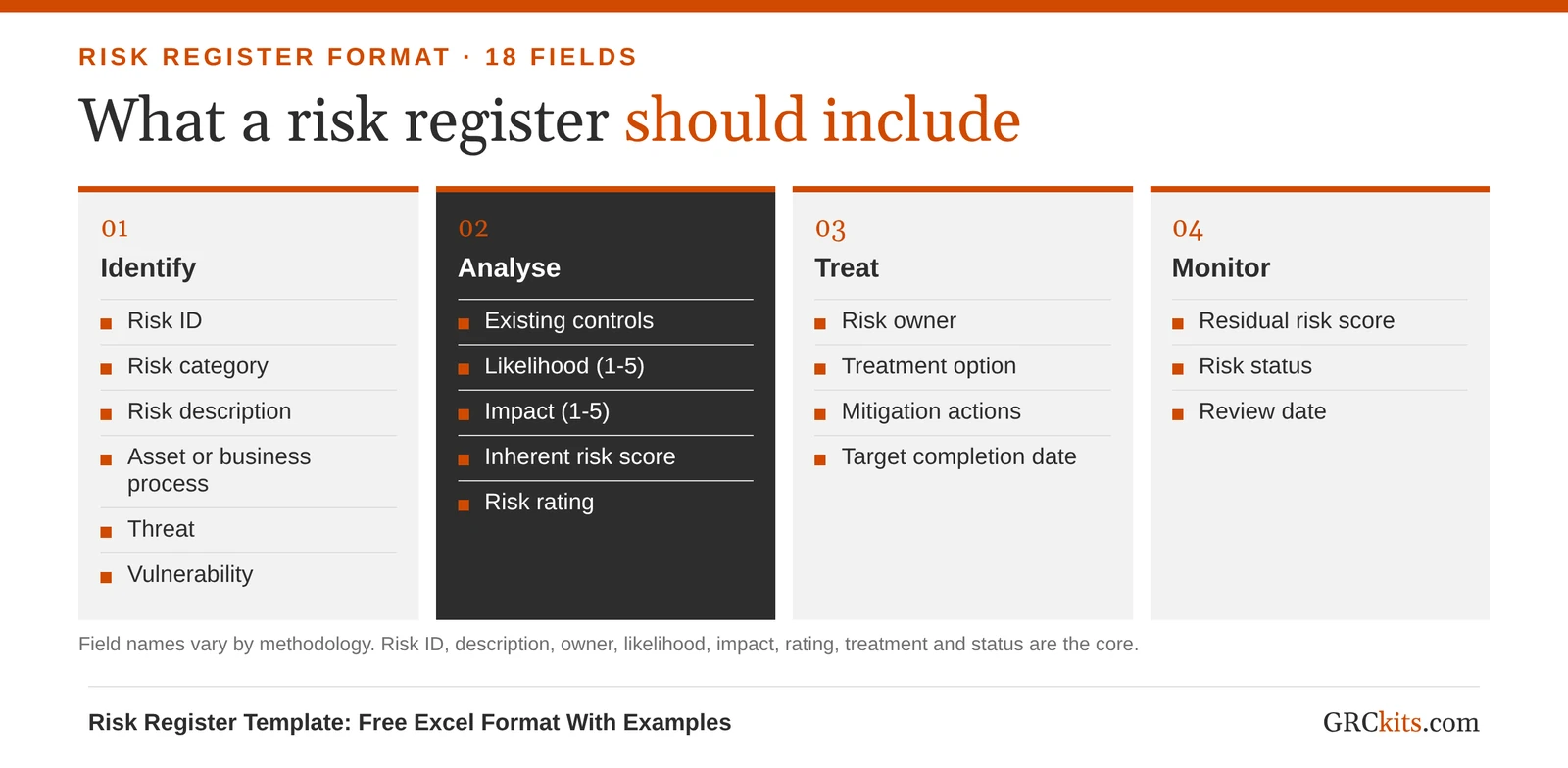
Field | What it records | Core or optional |
|---|---|---|
Risk ID | A unique reference (R-001) used in treatment plans, the SoA and audit reports. | Core |
Risk category | A grouping such as access control, third party or business continuity, used for reporting. | Recommended |
Risk description | The scenario: what could happen, to what, and the consequence. | Core |
Risk owner | The person accountable for the risk and authorised to accept it. Usually a business or process owner, not the IT team by default. | Core |
Asset or business process | What the risk affects, ideally linked to your asset inventory. | Core for asset-based methods |
Threat | The cause or actor, for example ransomware, a disgruntled insider or a supplier failure. | Recommended |
Vulnerability | The weakness the threat would exploit, such as missing MFA or untested backups. | Recommended |
Existing controls | Controls already in place, so the score reflects reality rather than a worst case. | Core |
Likelihood | How probable the scenario is, on your agreed scale (often 1-5). | Core |
Impact | How severe the consequence would be on the same kind of scale. | Core |
Inherent risk score | The current score before new treatment. In many registers this means "with existing controls". | Core |
Risk rating | The band the score falls into: Low, Medium, High or Critical. | Core |
Risk treatment option | Modify, retain, avoid or share (the option names used in ISO/IEC 27005:2022). | Core |
Additional mitigation actions | The specific actions or controls to be added. | Core when treating |
Residual risk score | The expected score once the actions are complete. | Core |
Target completion date | When the treatment should be finished. | Core when treating |
Risk status | Open, in progress, accepted or closed. | Core |
Review date | When the risk was last reviewed and when it is due again. | Core |
Which fields you need depends on your methodology. An asset-based assessment needs the asset, threat and vulnerability columns. An event- or scenario-based assessment (both approaches are described in ISO/IEC 27005:2022) can describe the scenario directly and drop the separate threat and vulnerability fields. Some organisations add columns for risk appetite, cost of treatment, related Annex A controls or a "residual risk accepted" sign-off.
Risk Register Format: Understanding the Structure
A good risk register format in Excel keeps one risk per row, inputs separated from calculations, and every score driven by formulas. The layout that works best in practice looks like this:
One sheet for criteria (likelihood scale, impact scale, rating bands, treatment options). Formulas look these up, so changing a threshold updates every rating.
One sheet for the register, with frozen header rows, filters, drop-down lists for treatment and status, and data validation that only allows 1-5 in the score columns.
One sheet for the heat map and summary, built from COUNTIFS so it never goes out of date.
The core columns, in a simple risk register template Excel layout, look like this:
Risk ID | Risk description | Likelihood | Impact | Risk score | Risk rating | Treatment | Risk owner | Status |
|---|---|---|---|---|---|---|---|---|
R-001 | Unauthorised access to the ERP through stolen credentials could allow fraudulent transactions | 4 | 5 | 20 | Critical | Modify | Head of IT | In progress |
R-005 | Backups may fail to restore critical systems after an incident | 3 | 5 | 15 | High | Modify | Infrastructure Manager | In progress |
R-010 | Untested changes to production could cause outages | 3 | 3 | 9 | Medium | Retain | Head of IT | Accepted |
Scores and ratings above are illustrative examples from the sample workbook, not values to copy into your own register.
Risk Register Template Excel: Practical Examples
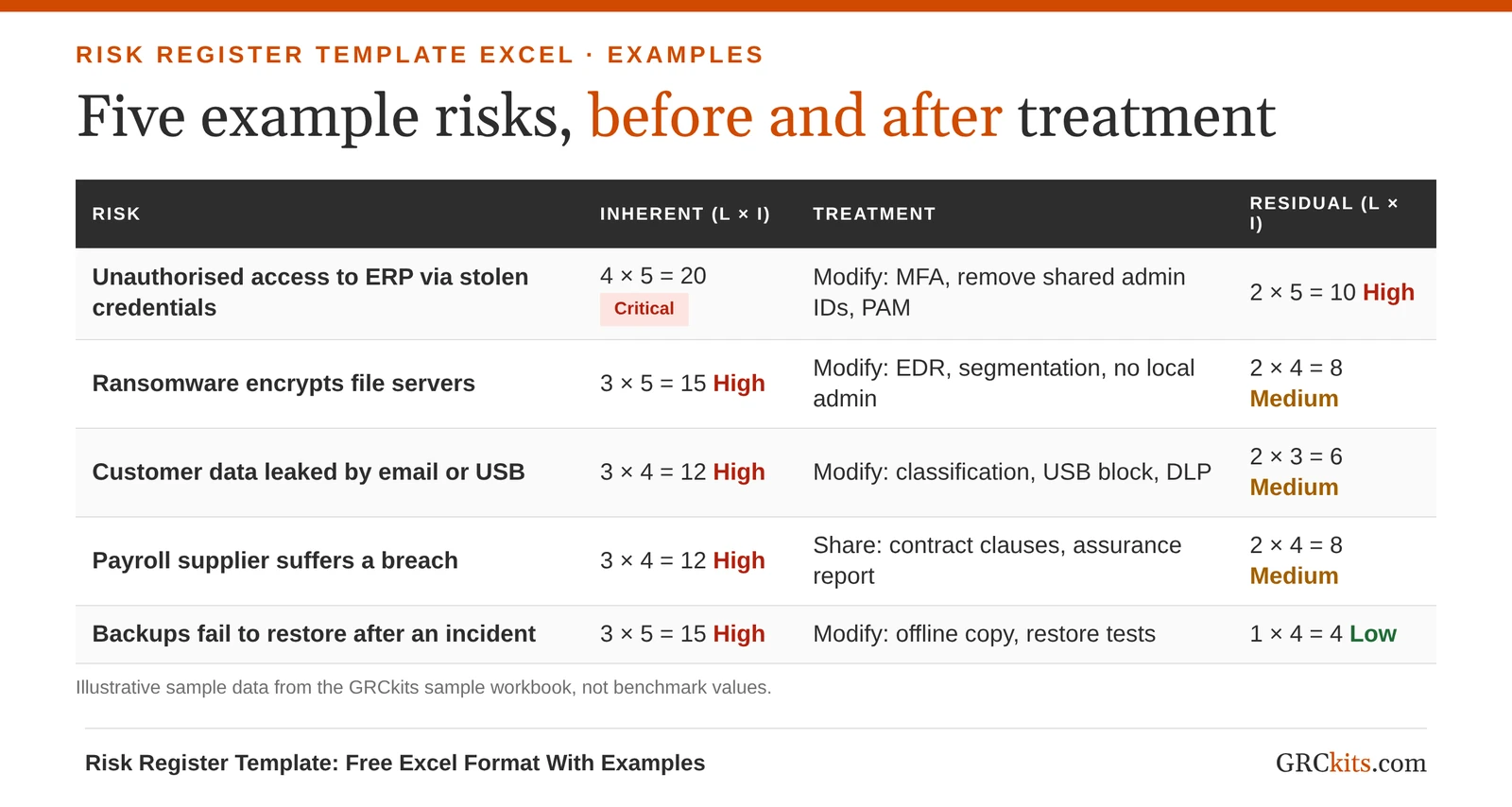
Below are five realistic entries of the kind found in an IT or cybersecurity risk register. Each is written as a scenario, scored before and after treatment, and linked to an action someone can be held to. The likelihood, impact and rating values are illustrative: your own scores depend on your environment, existing controls and approved criteria.
1. Unauthorised access to critical business systems
Risk description: Unauthorised access to the ERP application through compromised credentials could lead to fraudulent transactions and data exposure.
Threat and vulnerability: Credential theft through phishing or password reuse; no MFA on remote access and shared administrator accounts.
Likelihood / impact / rating: 4 × 5 = 20, Critical (illustrative).
Recommended treatment: Modify.
Example mitigation actions: Enforce MFA for remote and privileged access, remove shared admin IDs, introduce privileged access management. Example residual: 2 × 5 = 10, High, because the impact of a successful compromise stays the same.
2. Ransomware or malware infection
Risk description: Ransomware could encrypt file servers and endpoints and stop operations for several days.
Threat and vulnerability: Ransomware delivered by email or exposed RDP; unpatched endpoints, a flat network and users with local admin rights.
Likelihood / impact / rating: 3 × 5 = 15, High (illustrative).
Recommended treatment: Modify.
Example mitigation actions: Endpoint detection and response, network segmentation, removal of local admin rights, closing internet-facing RDP. Example residual: 2 × 4 = 8, Medium.
3. Data leakage or unauthorised disclosure
Risk description: Customer personal data could be disclosed through email or removable media, leading to regulatory penalties and loss of customer trust.
Threat and vulnerability: Accidental or deliberate leakage by staff; no data loss prevention, open USB ports, no data classification.
Likelihood / impact / rating: 3 × 4 = 12, High (illustrative).
Recommended treatment: Modify.
Example mitigation actions: Classify data, block USB storage, add email DLP rules, run targeted awareness sessions. Example residual: 2 × 3 = 6, Medium.
4. Third-party service provider security failure
Risk description: A security breach at the outsourced payroll provider could expose employee salary and identity data.
Threat and vulnerability: A breach at the supplier; a contract with no security clauses, breach notification duty or audit right.
Likelihood / impact / rating: 3 × 4 = 12, High (illustrative).
Recommended treatment: Share, combined with contractual controls.
Example mitigation actions: Add security and breach-notification clauses, obtain an annual independent assurance report, review the supplier's access. Example residual: 2 × 4 = 8, Medium. Sharing a risk moves part of the consequence, not the accountability: your organisation still owns the personal data. For vendor reviews, a structured third-party security assessment helps evidence the decision.
5. Backup failure and data recovery risk
Risk description: Backups may fail to restore critical systems after an incident, extending downtime beyond what the business can tolerate.
Threat and vulnerability: Hardware failure, ransomware or human error; backups never test-restored and all copies online.
Likelihood / impact / rating: 3 × 5 = 15, High (illustrative).
Recommended treatment: Modify.
Example mitigation actions: Keep an offline or immutable copy, run quarterly restore tests, document recovery time and recovery point objectives per system. Example residual: 1 × 4 = 4, Low.
How to Calculate Risk Scores in a Risk Register
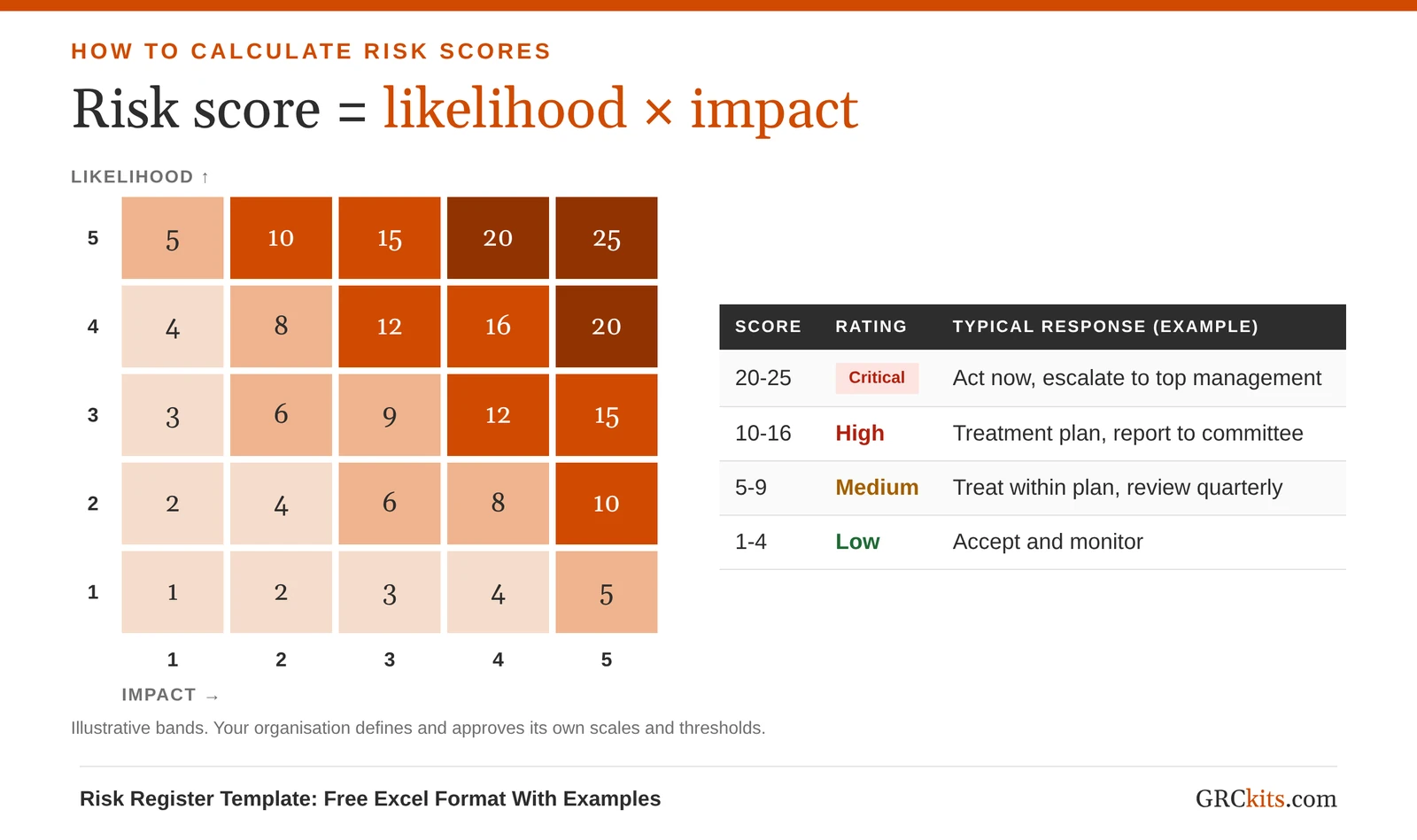
The most common qualitative method multiplies two ratings: risk score = likelihood × impact. With two 1-5 scales, scores range from 1 to 25, and a rating band turns each score into a priority.
Score | Likelihood (example) | Impact (example) |
|---|---|---|
1 | Rare: only in exceptional circumstances | Negligible: no service, regulatory or customer effect |
2 | Unlikely: could occur within 3 years | Minor: short disruption of a non-critical service |
3 | Possible: could occur within 12 months | Moderate: business service disrupted for hours, limited data exposure |
4 | Likely: expected within 12 months, has happened here before | Major: critical service down for a day or more, reportable data breach |
5 | Almost certain: expected several times a year | Severe: prolonged outage of core operations, legal or licence consequences |
A worked example: a risk rated Likelihood 3 and Impact 5 scores 3 × 5 = 15. Using illustrative bands of 1-4 Low, 5-9 Medium, 10-16 High and 20-25 Critical, it is a High risk.
These scales and bands are examples. ISO/IEC 27001:2022 clause 6.1.2 requires the organisation to establish its own risk criteria, including risk acceptance criteria, and to apply them so that repeated assessments give consistent, valid and comparable results. Your criteria should be approved by management and written down before scoring starts. For deeper guidance on likelihood and impact scales, NIST SP 800-30 Rev. 1 provides example assessment scales and tables that many teams adapt.
Two scoring points cause most arguments in review meetings. First, decide whether "inherent" means before any controls or with existing controls, and use one meaning throughout. Second, avoid scoring impact on the most extreme case you can imagine; score the realistic scenario you have written in the description.
How to Create a Risk Register in Excel: Step by Step
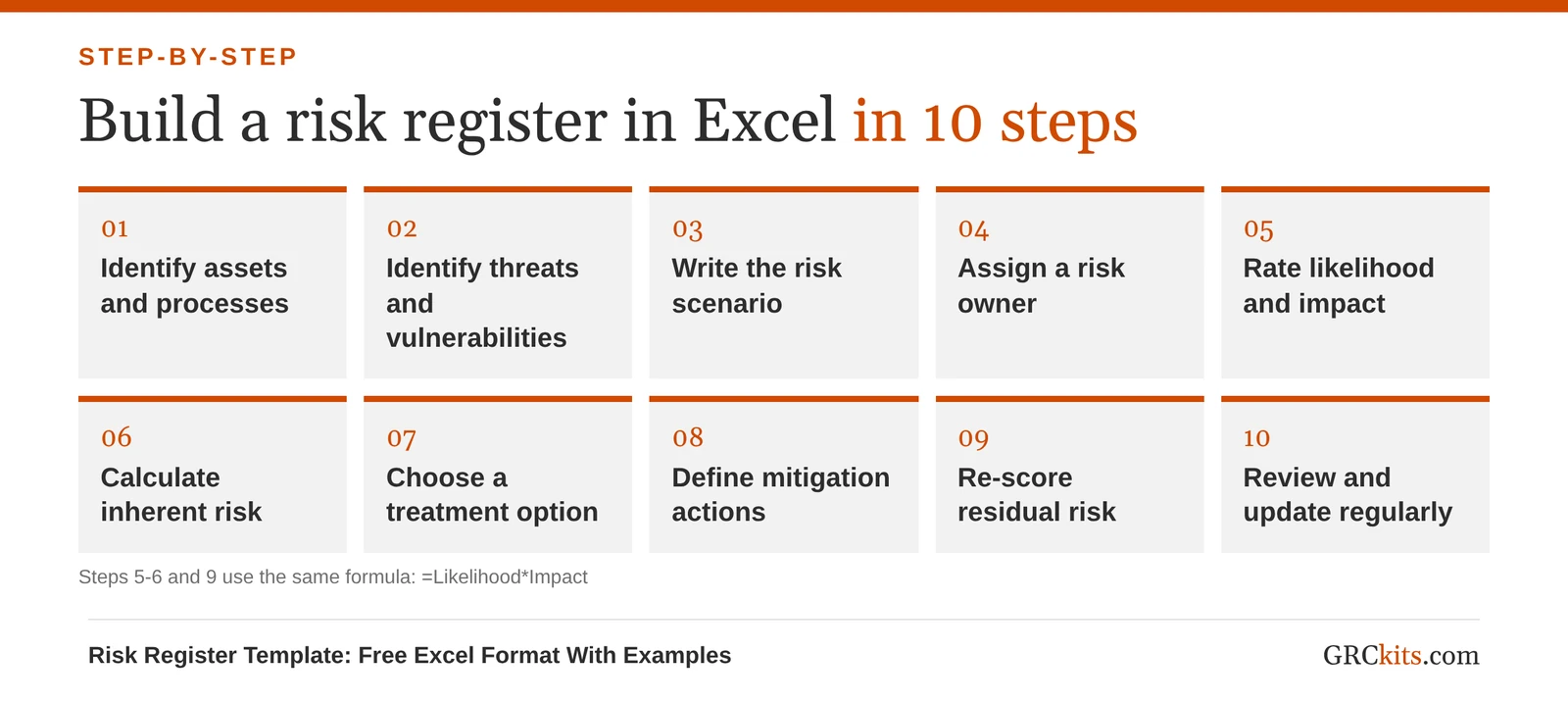
The formulas below use the column letters of the free sample workbook: I = Likelihood, J = Impact, K = Inherent score, T = Target date, U = Status and W = Last review. Adjust the letters if your own layout is different.
Identify assets and business processes. Start from your asset inventory (ISO/IEC 27001:2022 Annex A 5.9) and the processes inside your ISMS scope. List systems, data, people, facilities and suppliers that matter.
Identify threats and vulnerabilities. For each important asset, ask what could go wrong and what weakness would let it happen. Use incident history, audit findings and vulnerability scan results, not only brainstorming.
Document risk scenarios. Write each risk as one sentence: event + cause + consequence. "Ransomware delivered by email could encrypt file servers and stop operations for days" is assessable. "Cyber attack" is not.
Assign risk owners. Choose the person with authority over the affected process and budget, because ISO/IEC 27001 expects risk owners to approve the treatment plan and accept residual risk.
Evaluate likelihood and impact. Score each risk against your criteria sheet. In Excel, add data validation (Data > Data Validation > Whole number between 1 and 5) so nobody types 6 or "High".
Calculate inherent risk. In the score column use
=I5*J5. For the rating, look up your band table:=INDEX('Risk Criteria'!$B$22:$B$25, MATCH(K5, 'Risk Criteria'!$A$22:$A$25, 1)). A simpler option is=IF(K5>=20,"Critical",IF(K5>=10,"High",IF(K5>=5,"Medium","Low"))), but the lookup version lets you change thresholds in one place.Select risk treatment options. Add a drop-down list with Modify, Retain, Avoid and Share. Retain only where the score is within your acceptance criteria or management has formally accepted it.
Define mitigation actions. Write actions that can be verified ("enable MFA on VPN for all users") with an owner and a target date. Use conditional formatting such as
=AND($T5<TODAY(),$U5<>"Closed")to highlight overdue actions.Evaluate residual risk. Re-score likelihood and impact assuming the actions are complete, with the same formulas. Record whether the risk owner has accepted the residual level.
Monitor and review periodically. Add a last review date and a next review date (
=W5+90for a quarterly cycle). Build the heat map withCOUNTIFSso each cell counts the risks at that likelihood and impact.
The free sample workbook below already contains these formulas, drop-downs and conditional formatting, so you can see each step working before you build your own.
Download the Free Risk Register Template (Excel Sample)
To make this practical, we have prepared a free study workbook: GRCkits Risk Register Template (Sample). It is the file used for the examples on this page, and it is free: download the risk register template (Excel sample). It is also listed under Downloads at the end of this post.
Read Me: how the workbook works, the cell colour legend and the scoring method.
Risk Criteria: 1-5 likelihood and impact scales, rating bands, treatment options and a review interval, all editable.
Risk Register: 10 sample IT and cybersecurity risks with inherent and residual scores, example ISO/IEC 27001:2022 Annex A references, drop-down lists and 15 empty formatted rows for your own risks.
Risk Matrix: 5×5 heat maps for inherent and residual risk that update automatically.
Summary: counts by rating and status, average scores, overdue actions and a before-and-after chart.
All data in the file is sample data for learning. Replace the scales, bands and risks with your own approved criteria before using it in an ISMS.
IT Risk Register Template vs Business Risk Register Template
An IT or cybersecurity risk register focuses on information, systems and data, and is usually owned by the CISO or IT function. A business (enterprise) risk register covers strategic, financial, operational, people and reputational risks across the organisation, and is usually maintained by the risk function for senior management and the board.
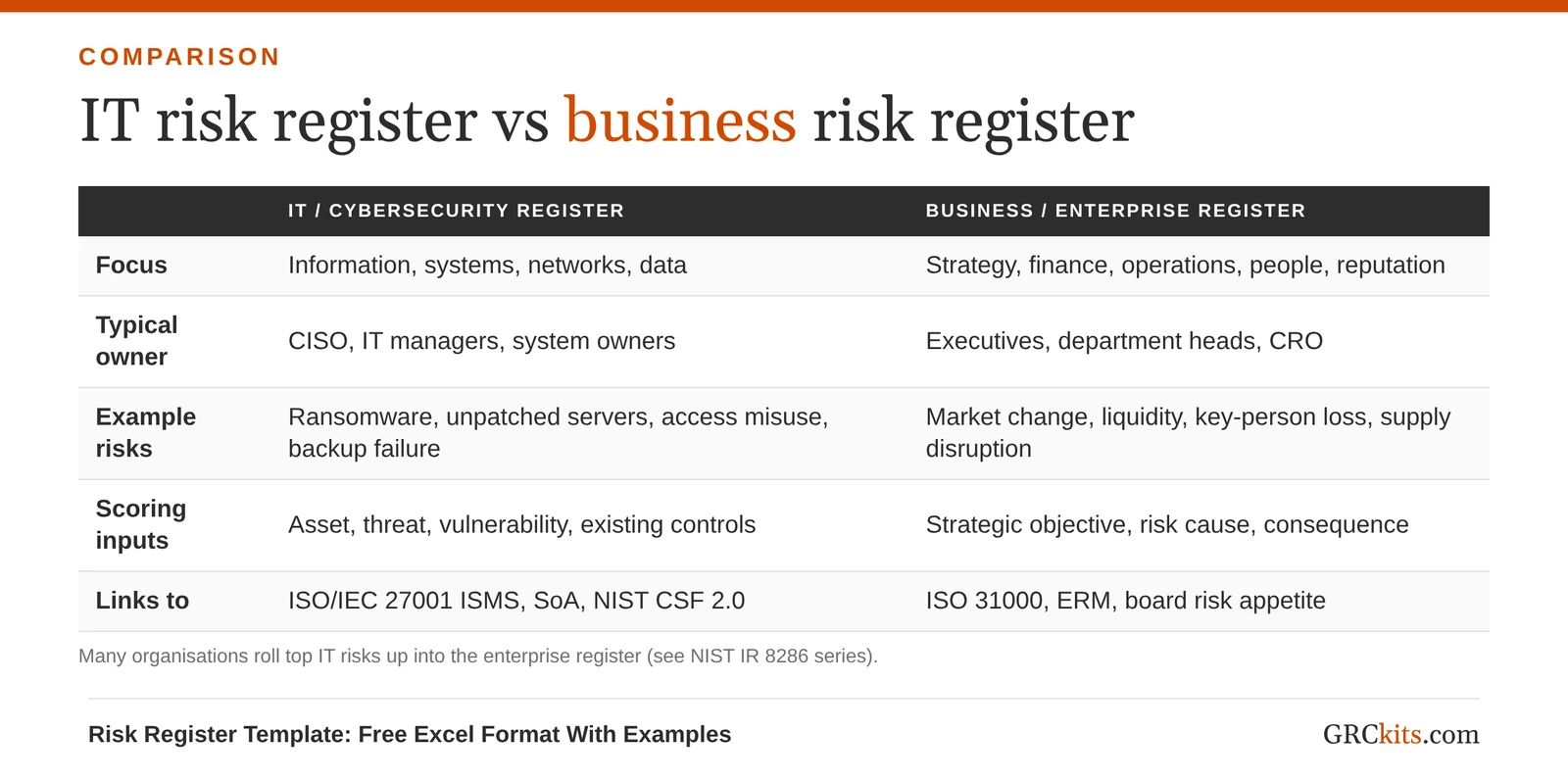
Examples in an IT risk register include ransomware, unpatched internet-facing systems, privileged access misuse and backup failure. A business risk register might hold loss of a major customer, liquidity pressure, key-person dependency and supply chain disruption. The two should connect: significant cybersecurity risks are often summarised and rolled up into the enterprise register. The NIST IR 8286 series describes exactly this, using cybersecurity risk registers to feed an enterprise risk register and risk profile, and NIST IR 8286A Rev. 1 covers identifying and estimating cybersecurity risk for that purpose. On the business side, ISO 31000:2018 gives general risk management guidelines.
A practical tip: use the same 1-5 scales in both registers, or document how one translates to the other. If IT calls something "High" and the enterprise team calls the same exposure "Medium", management will receive mixed messages.
Risk Register and ISO/IEC 27001:2022
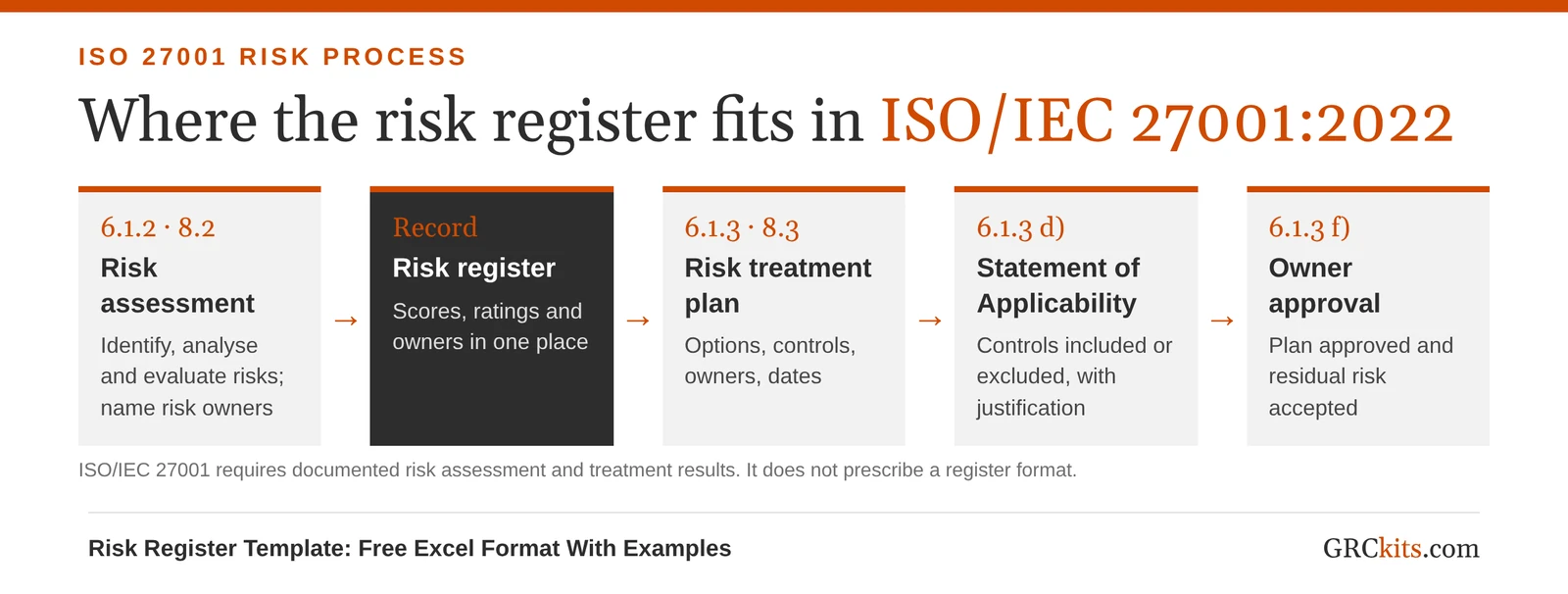
ISO/IEC 27001:2022 does not use the words "risk register" and does not require Excel or any particular layout. It does require a defined risk assessment and treatment process and retained documented information about its results. For most organisations, a risk register is the simplest way to hold that evidence.
Clause | What it requires (summary) | How the register supports it |
|---|---|---|
6.1.2 Information security risk assessment | Define and apply a process with risk criteria; identify risks and risk owners; analyse and evaluate risks. | Owner, likelihood, impact, score and rating columns; criteria sheet. |
6.1.3 Information security risk treatment | Select treatment options and controls; compare with Annex A; produce the Statement of Applicability; formulate a risk treatment plan; obtain risk owners' approval of the plan and acceptance of residual risks. | Treatment option, actions, Annex A references, residual score and acceptance columns. |
8.2 Information security risk assessment | Perform assessments at planned intervals or when significant changes are proposed or occur; retain the results. | Review dates and a dated version history of the register. |
8.3 Information security risk treatment | Implement the risk treatment plan; retain the results. | Status, target dates and evidence references for each action. |
The chain an auditor follows is simple: each risk in the register leads to a treatment decision; each treatment leads to controls; each control appears in the Statement of Applicability with a justification that points back to the risk; and the risk owner has approved the plan and accepted what is left. Our guide to the ISO 27001 Statement of Applicability explains how to write those justifications so they match your register. If you are earlier in the journey, start with the ISO 27001 implementation guide and define your ISMS scope first, because the scope decides which assets enter the register.
Outside ISO, NIST CSF 2.0 covers the same ground through the Govern function's Risk Management Strategy category (GV.RM) and the Identify function's Risk Assessment category (ID.RA). The register format in this article works for either framework, but mapping between them is partial, so a gap analysis is still needed if you report against both.
Common Risk Register Mistakes to Avoid
Vague risk descriptions. "Data breach" cannot be scored or treated. Write the cause, the event and the consequence.
No real risk owner. Listing "IT" or "Management" as owner means nobody is accountable. Name a role with authority to accept the risk.
Inconsistent scoring. Different teams using different scales, or scoring by gut feel, make the ranking meaningless. Use one approved criteria sheet.
Ignoring residual risk. A register that stops at the inherent score cannot show whether treatment worked or what management has accepted.
Not updating the register. If the file has not changed since the last audit, it does not reflect incidents, new systems or completed actions.
Treating it as a one-time document. A register built only for certification is usually abandoned after it. Link it to change management and management review so it stays in use.
Not tracking mitigation actions. Actions without owners, dates and status turn into a wish list. Track them in the register or a linked treatment plan.
If your register has grown past a few hundred rows or several contributors, compare spreadsheet and tool options in our article on ISO 27001 compliance software vs spreadsheets.
What Auditors Check in a Risk Register: Notes From the Field
The author of this guide, Shahidul Shubo, has audited more than 120 organisations across IT, information security and ISO/IEC 27001 engagements. Three risk register problems come up repeatedly in that work. None of them is caused by the template; all of them come from how the register is used.
1. The risk owner is just "IT"
A common pattern is a register where nearly every risk is owned by "IT Department" or "Management". That looks complete, but it means nobody with authority over the business process has looked at the risk. ISO/IEC 27001:2022 clause 6.1.2 asks the organisation to identify risk owners, and clause 6.1.3 f) expects those owners to approve the treatment plan and accept the residual risk. An IT team can implement controls, but it usually cannot accept a fraud or regulatory risk on behalf of finance or operations. The fix is simple: name the role that owns the process and the budget, such as Head of Finance for a payment fraud risk.
2. Residual risk with no sign-off
Another frequent finding is a register that shows residual scores but no evidence that anyone accepted them. The numbers are there; the decision is not. Auditors then raise it against clause 6.1.3 f). Acceptable evidence does not need to be elaborate: a dated "Residual risk accepted by owner" column, a signed or emailed approval of the treatment plan, or security committee minutes that list the accepted risks are all common ways to show it.
3. Updated once a year, just before the audit
Many registers are refreshed only when the audit is near. The signs are easy to spot: every row has the same review date, risks linked to incidents from the past year still show their old scores, and systems introduced during the year are missing. Clause 8.2 expects assessments at planned intervals and when significant changes occur, so a register that only moves once a year usually fails both tests. Linking register updates to change management and incident closure keeps it current without extra meetings.
Checklist: what to have ready before an audit
What an auditor typically checks | Evidence that answers it |
|---|---|
Risk criteria are defined and approved | Approved likelihood, impact and acceptance criteria, with a date and approver |
Every risk has a real owner | Named roles with authority over the process, not departments |
Scores follow the criteria | A few risks re-scored during the audit give the same result |
Treatment actions are tracked | Owner, target date, status and evidence for each action |
Residual risk is accepted | Owner acceptance recorded with a date |
Register and SoA agree | Controls in the Statement of Applicability trace back to risks in the register |
The register is current | Recent review dates, recent incidents and new systems reflected, version history kept |
How Often Should a Risk Register Be Reviewed?
There is no single required frequency. ISO/IEC 27001:2022 clause 8.2 asks for risk assessments at planned intervals and when significant changes are proposed or occur, so the review cycle is yours to define and justify. A common pattern is:
Scheduled reviews: High and Critical risks monthly or quarterly, Medium and Low risks at least annually, and a full reassessment once a year before the management review.
Event-driven reviews: a major system change or migration, a security incident or near miss, a newly disclosed vulnerability affecting your systems, a change in law or regulation, a new or changed critical supplier, a merger, or a change in business strategy.
Record each review with a date and who took part. The results of risk assessment and the status of the treatment plan are also inputs to the ISO/IEC 27001 management review (clause 9.3), so a current register makes that meeting much easier. Risk ratings can also feed your risk-based internal audit plan.
Get a Ready-to-Use Risk Register Dashboard
Looking for a practical risk register format beyond the free sample? The ISO 27001 Risk Assessment & Risk Register Dashboard is an Excel-based tool for assessing risks, tracking treatment plans and monitoring inherent and residual risk, with an executive dashboard for management reporting. If you need the full set of ISMS documents around it, see the ISO 27001 Full Assessment Toolkit.
Whichever route you take, a template only helps if the criteria behind it are agreed and the register is reviewed. The tool saves build time; the decisions still belong to your risk owners.
Frequently Asked Questions (FAQs)
What is a risk register template?
A risk register template is a pre-built document, usually an Excel workbook, with the columns, scales and formulas needed to record risks consistently. It typically includes risk ID, description, owner, likelihood, impact, score, rating, treatment, residual risk, status and review dates.
How do I create a risk register in Excel?
Create a criteria sheet with your scales and rating bands, then a register sheet with one risk per row. Calculate the score with =Likelihood*Impact, look up the rating from the band table, add drop-downs for treatment and status, and build a 5×5 heat map with COUNTIFS.
What are the five main components of a risk register?
There is no official list, but most practitioners treat these five as essential: a clear risk description with an ID, a named risk owner, the risk assessment (likelihood, impact and rating), the risk response or treatment with actions, and the current status with review dates.
What is the difference between a risk register and a risk assessment?
A risk assessment is the process of identifying, analysing and evaluating risks against agreed criteria. A risk register is the record where the results are stored and then maintained as treatments progress and conditions change.
What is a good risk register format?
A good format keeps one risk per row, separates inputs from formula-driven scores, uses a single approved scoring scale, shows inherent and residual risk side by side, and includes owner, target date, status and review date so progress can be tracked.
Is there a free risk register template Excel download?
Yes. This post includes a free GRCkits sample workbook with 10 example risks, scoring formulas, a 5×5 heat map and a summary sheet. Download the Excel sample here.
What is an IT risk register?
An IT risk register records risks to information systems, networks, applications and data, such as ransomware, unauthorised access, data leakage, supplier failure and backup failure. It is usually owned by the CISO or IT function and supports frameworks like ISO/IEC 27001 and NIST CSF 2.0.
Is a risk register required for ISO 27001?
ISO/IEC 27001:2022 does not mandate a document called a risk register. It requires documented information about the risk assessment and treatment process and their results, including a risk treatment plan and Statement of Applicability. A risk register is the most common way to meet that requirement.
Conclusion
A useful risk register template does three things well: it describes risks clearly enough to score, it applies one agreed scoring method, and it tracks treatment through to accepted residual risk. Start with the 18 fields above, agree your criteria before scoring, and review the register on a schedule and whenever something significant changes.
As a next step, download the free sample workbook, replace the example risks with five real ones from your own environment, and take the result to your risk owners for review.
Downloads

Written by
Shahidul Shubo
Cybersecurity GRC Consultant
Shahidul Shubo is a Cybersecurity GRC Consultant with 10+ years of experience in information security governance, risk management, regulatory compliance and IT audit, and has audited more than 120 organisations. He is CISA and CISM certified, an ISO/IEC 27001 Lead Auditor and Lead Implementer, and a Lead Auditor for ISO/IEC 27701, ISO/IEC 42001, ISO 22301 and ISO 9001. His technical credentials include AWS Solutions Architect, AWS Security Specialty, Red Hat RHCA and RHCE, Fortinet NSE and CCEP. He works hands-on with ISO 27001, NIST CSF and NCA ECC, and builds the practical templates and assessment tools published on GRCkits.
Connect on LinkedInNeed hands-on help?
Information Security Management System (ISMS)
Design, implement and certify an ISO/IEC 27001 ISMS that protects the confidentiality, integrity and availability of your information.
Request a quote