Two weeks before an internal audit, the question is rarely "do we have a policy?" It is "which of the 93 Annex A controls are actually done, who owns the rest, and what will the auditor ask for first?" If the honest answer lives across five spreadsheet versions and someone's inbox, the problem is not ISO/IEC 27001. It is the way progress is being tracked.
This guide compares the two common answers: ISO 27001 compliance software and spreadsheets. You will see what each one does well, where each one breaks, and what an audit dashboard must show before management can act on it. At the end you will know which option fits your ISMS today and how to run a full implementation-to-audit loop in Excel if that is where you start.
Quick answer: compliance software or spreadsheets?
ISO 27001 compliance software suits organisations with many cloud systems, several frameworks and the budget for a yearly subscription, because it can collect evidence automatically through integrations. A structured spreadsheet suits a single ISMS scope, a small GRC team or a first certification cycle. Either way, the tool must link controls, owners, audit findings and corrective actions in one view.
The deciding factor is not "software good, Excel bad". It is whether your tracking is structured: fixed statuses, owners, dates, evidence references and formulas that turn raw entries into a management signal. A blank spreadsheet has none of that. A well-built workbook has most of it.
What ISO 27001 actually requires you to track
Before choosing any tool, be clear about what the standard asks for. Under ISO/IEC 27001:2022, clauses 4 to 10 are mandatory requirements. Annex A lists 93 reference controls in four themes: 37 organizational, 8 people, 14 physical and 34 technological. Eleven of them are new compared with the 2013 edition. You select the controls that apply through your risk assessment and justify every inclusion and exclusion in the Statement of Applicability (clause 6.1.3).
For audit tracking, four clauses matter most:
Clause | What it requires | What you need to track |
|---|---|---|
6.1.3 Risk treatment | A Statement of Applicability with justifications | Which controls are in scope, and why |
9.2 Internal audit | Audits at planned intervals, an audit programme, results reported to management | Audit plan, questions, results, evidence reviewed |
9.3 Management review | Top management reviews the ISMS, including audit results and nonconformities | A summary management can read in minutes |
10.2 Nonconformity and corrective action | React, find the root cause, act, review effectiveness | Findings, root cause, actions, owners, dates, closure evidence |
Clauses 9.2 and 10.2 also require you to keep documented information as evidence of the audit programme, its results and the corrective actions taken. That is the part tools are really for. The standard does not require software, and it does not forbid spreadsheets. It requires evidence that the process works.
For guidance on how to audit (as opposed to what to audit), most audit teams use ISO 19011. Its fourth edition, ISO 19011:2026, was published in May 2026 and replaced the 2018 edition. It adds more guidance on remote and hybrid audits, which matters if your evidence lives in shared drives and online tools. ISO 19011 is guidance, not a certifiable requirement.
For ISMS audits specifically, ISO/IEC 27007:2020 adds guidance on top of ISO 19011. It covers managing an ISMS audit programme, auditing against the ISO/IEC 27001 requirements and the competence of ISMS auditors. A revised edition is in draft, so check for the current version before you cite it in your audit procedure.
From the author's audits. Across the internal audits I have led, the evidence gap that comes up most often is the review date. The policy or control exists and has an owner, but nobody can show when it was last reviewed. Whatever tool you pick, make the owner, the last review date and the evidence reference mandatory fields.
Example from a bank audit. In an ISO 27001 internal audit at a bank, 12 of the 40 controls reviewed had no record of their last review. Three changes fixed it. Owner and review date became mandatory fields in the tracker, a dashboard showed open items, and the ISMS team started a monthly review meeting. The certification audit that followed raised no major nonconformities.
What ISO 27001 compliance software actually does
ISO 27001 compliance software (also called ISMS software or a compliance automation platform) is a subscription platform that holds your ISMS and maps controls to frameworks. It also connects to your systems to test controls and collect evidence. Well-known names include Vanta, Drata, Secureframe, Sprinto, ISMS.online and Hyperproof. They differ in emphasis: some lead with automated monitoring of cloud infrastructure, others with a guided ISMS structure and documentation.
Typical capabilities:
Integrations and automated evidence. Connectors to cloud providers, identity providers, HR systems and ticketing tools pull configuration data and flag failing controls. Vendors such as Drata describe this as continuous monitoring.
Pre-built control libraries with mappings to SOC 2, ISO 27001, GDPR and other frameworks, so one control can serve several standards. In a spreadsheet you can do this by hand, as our guide to a SOC 2 dashboard in Excel shows.
Workflow: task assignment, reminders, policy acceptance tracking and an audit trail of who changed what.
Auditor access to evidence, and in some products a public trust page for customers.
Dashboards that update without anyone touching a formula.
The limits are just as real. Pricing is usually quote-based and annual, so you pay every year, not once. Automation covers what connectors can reach; on-premise core systems, network devices and physical controls still need manual evidence. Set-up takes time, and the platform's control model may not match your risk method. Finally, an automated "green" status only means a test passed. It does not tell you whether the control is effective for your risks. That judgement stays with people.
Where spreadsheets work, and where they fail
Spreadsheets remain the most common ISO 27001 tracking tool in small and mid-sized organisations. The reasons are simple. Everyone has Excel, there is no subscription and the data stays in-house. You can also shape the workbook to your own audit method.
They fail in predictable ways:
No structure. Free-text status cells ("almost done", "WIP", "pending IT") cannot be counted, so there is no reliable percentage.
Version sprawl. "ISMS_tracker_final_v7_JK.xlsx" in three inboxes means nobody knows which file is true.
No link between layers. The control list, the audit checklist, the findings list and the action plan sit in separate files, so a closed action never updates the finding or the control.
No dates, no alerts. Without target dates and an as-of date, nothing turns overdue on its own.
No management view. Top management gets a 200-row sheet instead of a one-page answer.
Notice that none of these failures come from Excel itself. They come from the spreadsheet having no design. That is the difference between a blank spreadsheet and a structured toolkit.
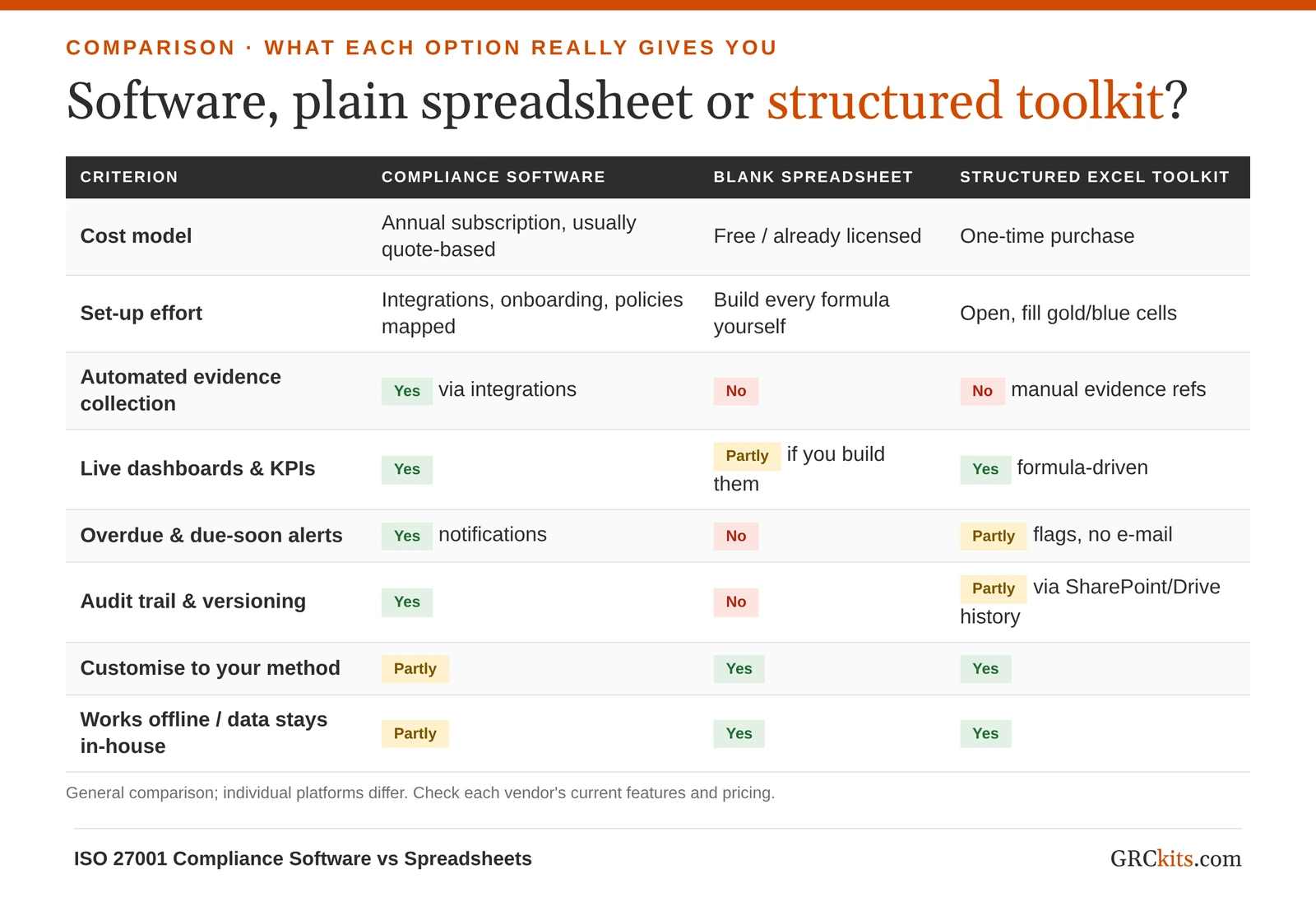
ISO 27001 compliance software vs spreadsheets: side-by-side
Criterion | Compliance software | Blank spreadsheet | Structured Excel toolkit |
|---|---|---|---|
Cost model | Annual subscription, usually quote-based | Free or already licensed | One-time purchase |
Set-up effort | Integrations, onboarding, control mapping | Build every formula and list yourself | Fill the input cells; formulas are ready |
Automated evidence collection | Yes, through integrations | No | No; evidence is referenced manually |
Dashboards and KPIs | Yes, live | Only if you build them | Yes, formula-driven |
Overdue and due-soon flags | Yes, with notifications | No | Yes, flags in the sheet (no e-mail alerts) |
Audit trail and version history | Built in | No | Via SharePoint, OneDrive or Google Drive history |
Fit to your own method | Partly; you adapt to the platform | Fully | Fully, and editable |
Data location | Vendor's cloud | Your environment | Your environment |
Multi-framework mapping | Strong | Manual | Manual |
This is a general comparison. Individual platforms differ, so check each vendor's current features and pricing before you decide.
Platforms and tools for tracking ISO 27001 audit progress with actionable insights
"Audit progress" means two different things, and good tools track both:
Implementation progress: how many in-scope controls are planned, in progress, implemented and verified, by theme and by owner.
Audit outcome: how many audit questions conform, how many findings are open, how serious they are and whether corrective actions close on time.
A tool gives actionable insights only when its numbers point to a decision. "62% implemented" is a fact. "Technological controls are at 31%, eight of them have no owner, and three are past their target date" is an insight, because it tells management who to call and what to fund.
What a good ISO 27001 audit management dashboard should show
When you compare ISO 27001 audit management tools with dashboards, whether a platform or an Excel workbook, check that the dashboard answers these questions without anyone filtering a sheet:
Question management asks | Metric that answers it |
|---|---|
Are we on track for certification? | Overall implementation % against a target, and verified-effective count |
Where are we weakest? | Progress or compliance % by Annex A theme and by clause group |
How bad are the audit results? | Major NCs, minor NCs, observations and OFIs, with a weighted compliance score |
What is our risk exposure? | Open findings on a likelihood × impact heat map |
Who is behind? | Open and overdue items by owner; controls with no owner |
Are fixes actually closing? | Action closure rate, overdue actions, actions due in the next 30 days |
What do you need from us? | A short list of decisions requested, in plain language |
If a dashboard cannot answer the last row, it is a report, not a management tool. For security metrics beyond the audit itself, such as patching or incident trends, a separate set of cybersecurity KPI templates keeps those numbers out of the audit view.
ISO 27001 audit automation tools: documentation and tracking compared
Tools that automate ISO 27001 audit requirements fall into three groups. Knowing which group you are buying from avoids paying for automation you cannot use.
Evidence automation platforms. They connect to cloud and SaaS systems and pull evidence automatically. Strongest when most of your scope is cloud-native.
GRC and audit management suites. They focus on workflow: audit programmes, checklists, findings, actions and approvals across many standards. Strongest in larger organisations with an internal audit function.
Formula-driven templates and workbooks. They automate the calculation and reporting layer rather than evidence collection. Status, scores, risk ratings, overdue flags, charts and management summaries update by themselves once the inputs are entered.
For documentation and tracking, the third group automates more than most people expect. What it cannot do is reach into your firewall or identity provider and fetch a screenshot. In practice, organisations with on-premise or regulated environments, such as banks and other financial institutions, collect much of that evidence manually anyway, because connectors do not reach their core systems.
How to run the full loop in Excel: two linked GRCkits tools
If a structured spreadsheet fits your situation, the work splits naturally into two stages: implementing controls, then auditing them. GRCkits has one workbook for each stage.
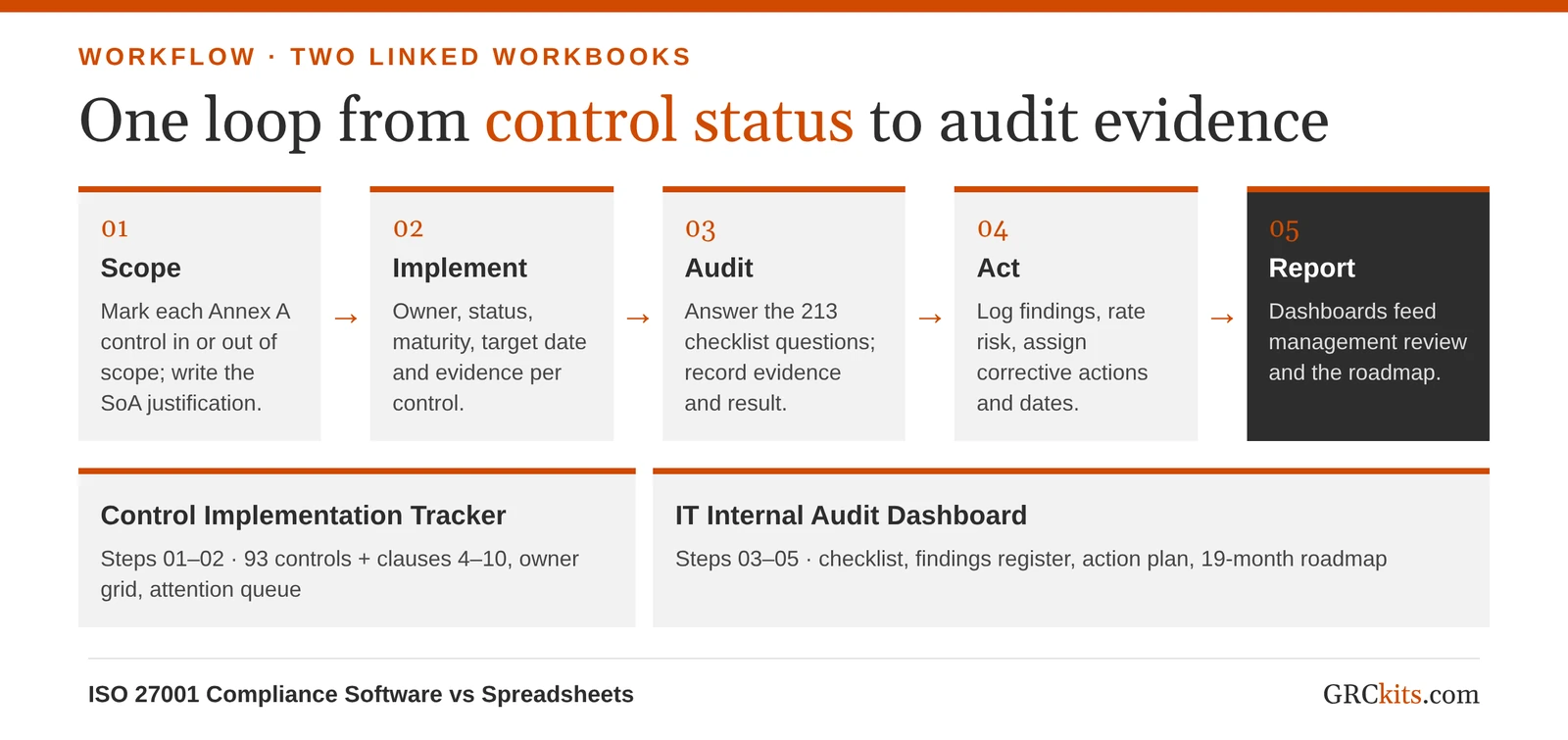
Stage 1: track implementation with the ISO 27001:2022 Control Implementation Tracker
The ISO 27001:2022 Control Implementation Tracker is an editable Excel workbook with five sheets: Setup, Annex A (the control ledger), Clauses, Owners and a management Dashboard.
How to use it
Setup. Enter your organisation, ISMS scope, report date and owners or departments. Set your management target (for example 85%) and the "due soon" window (30 days by default). The progress credit for each status is editable: Not Started 0%, Planned 10%, In Progress 50%, Implemented 90%, Verified 100%.
Annex A ledger. All 93 controls are pre-listed with their theme, and the 11 controls new in 2022 are marked. For each one, set In scope? (Yes/No), which makes the sheet double as your Statement of Applicability working list. Then record status, maturity (0 to 5), owner, target date, last review date, evidence reference, next action and SoA justification. A reference column describes what auditors usually look for, such as role descriptions, RACI and appointment letters for A.5.2.
Clauses. Track the 25 requirement lines of clauses 4.1 to 10.2 the same way. The sheet tells you which ones require documented information, for example the ISMS scope (4.3) and the risk treatment process and SoA (6.1.3).
Owners. This sheet fills itself: controls assigned, done, open and overdue per owner, plus a count of in-scope controls with no owner.
Dashboard. Read it; there is nothing to type.
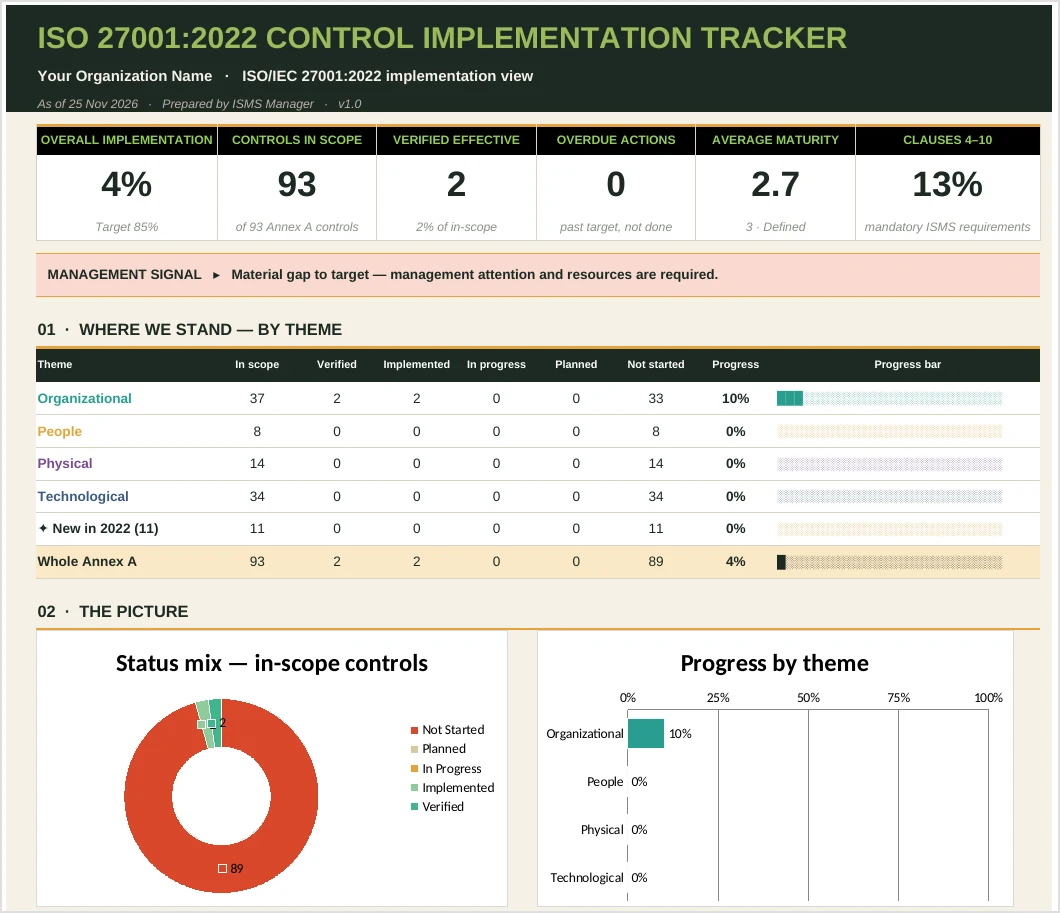
Template view with example entries. Your figures replace them as you fill the ledger.
What you get from it
Six headline KPIs: overall implementation against target, controls in scope, verified effective, overdue actions, average maturity and clause progress.
A one-line management signal that changes with the numbers: on target, within reach, or a material gap that needs resources.
Progress by theme (Organizational, People, Physical, Technological) and a separate line for the 11 controls new in 2022. These are the controls most often missing from ISMS documentation written for the 2013 edition.
An attention queue that ranks the ten controls needing management attention first. The score weighs low progress, overdue or due-soon dates, missing dates and new 2022 controls.
Out-of-scope controls drop out of every percentage, so your figures always match your SoA.
Stage 2: audit and report with the ISO 27001 IT Internal Audit Dashboard
Once controls are in place, clause 9.2 requires you to audit them. The ISO 27001 IT Internal Audit Dashboard is an Excel workbook with seven sheets: Cover, Dashboard, Checklist, Findings, Action_Plan, Roadmap and Config.
How to use it
Config. Enter the organisation, audit title, scope, auditors, audit period and report date. The report date drives every overdue and due-soon calculation. Scoring weights, risk thresholds and dropdown lists are editable here.
Checklist. Work through 213 audit questions covering clauses 4 to 10 and Annex A, based on the ISMS-FORM-09-4 internal audit checklist. For each question, choose a result (Conforming, Opportunity for Improvement, Observation, Minor NC, Major NC, Not Applicable or Not Yet Assessed) and record the finding and the evidence you reviewed.
Findings. Log one row per nonconformity, observation or OFI against its question ID. Domain, control and classification pull through automatically. Add root cause, likelihood and impact (1 to 5), risk owner and status.
Action_Plan. Add corrective, preventive or improvement actions against each finding, with owner, priority, dates, % complete, closure evidence and an effectiveness check, which is what clause 10.2 asks you to review.
Roadmap. List remediation initiatives by phase (Stabilise, Strengthen, Optimise) with dates and effort. Gantt bars draw themselves across a 19-month view.
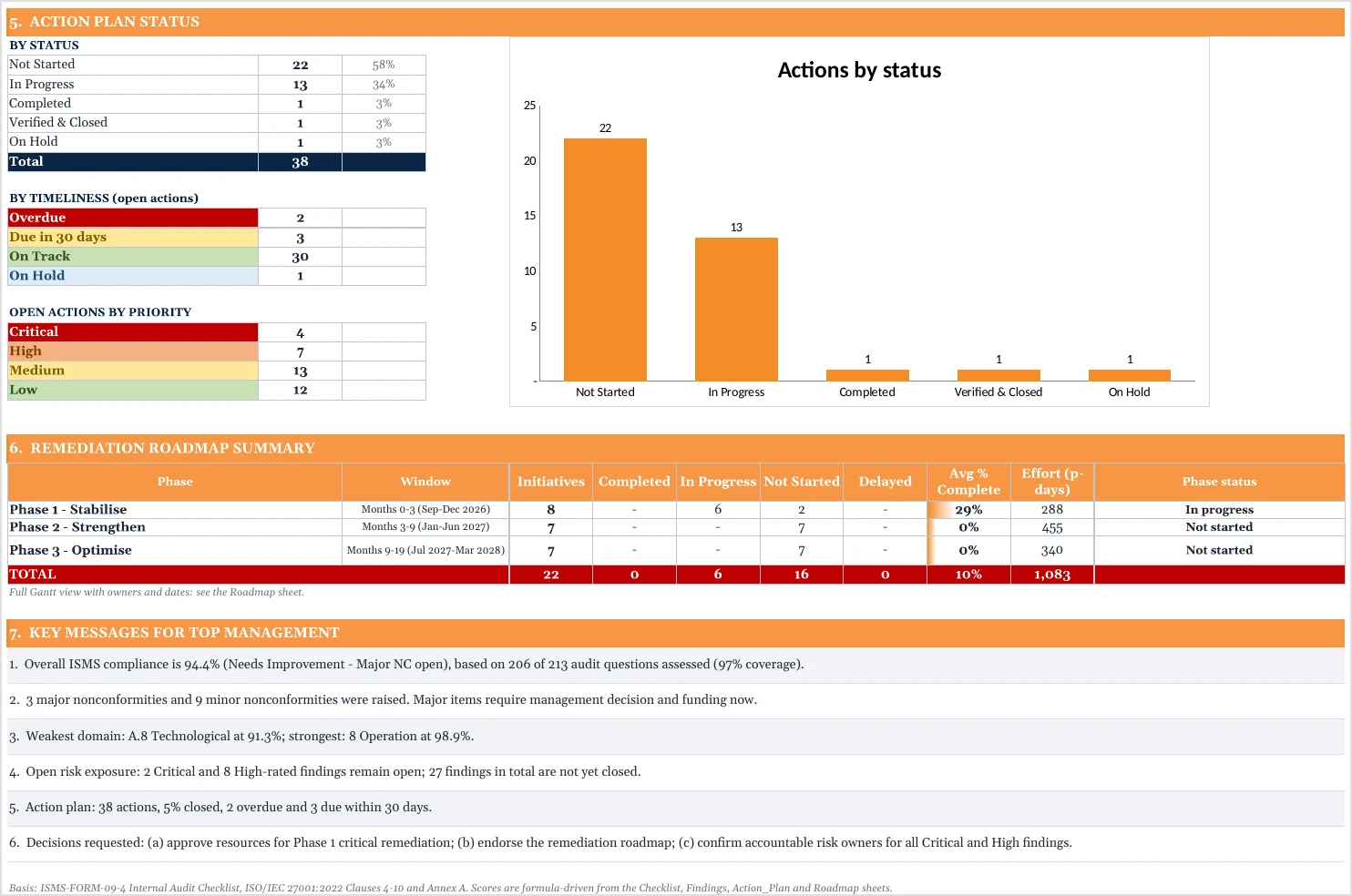
Dashboard. Review it and print it to PDF for top management. It fits one A4 page width.
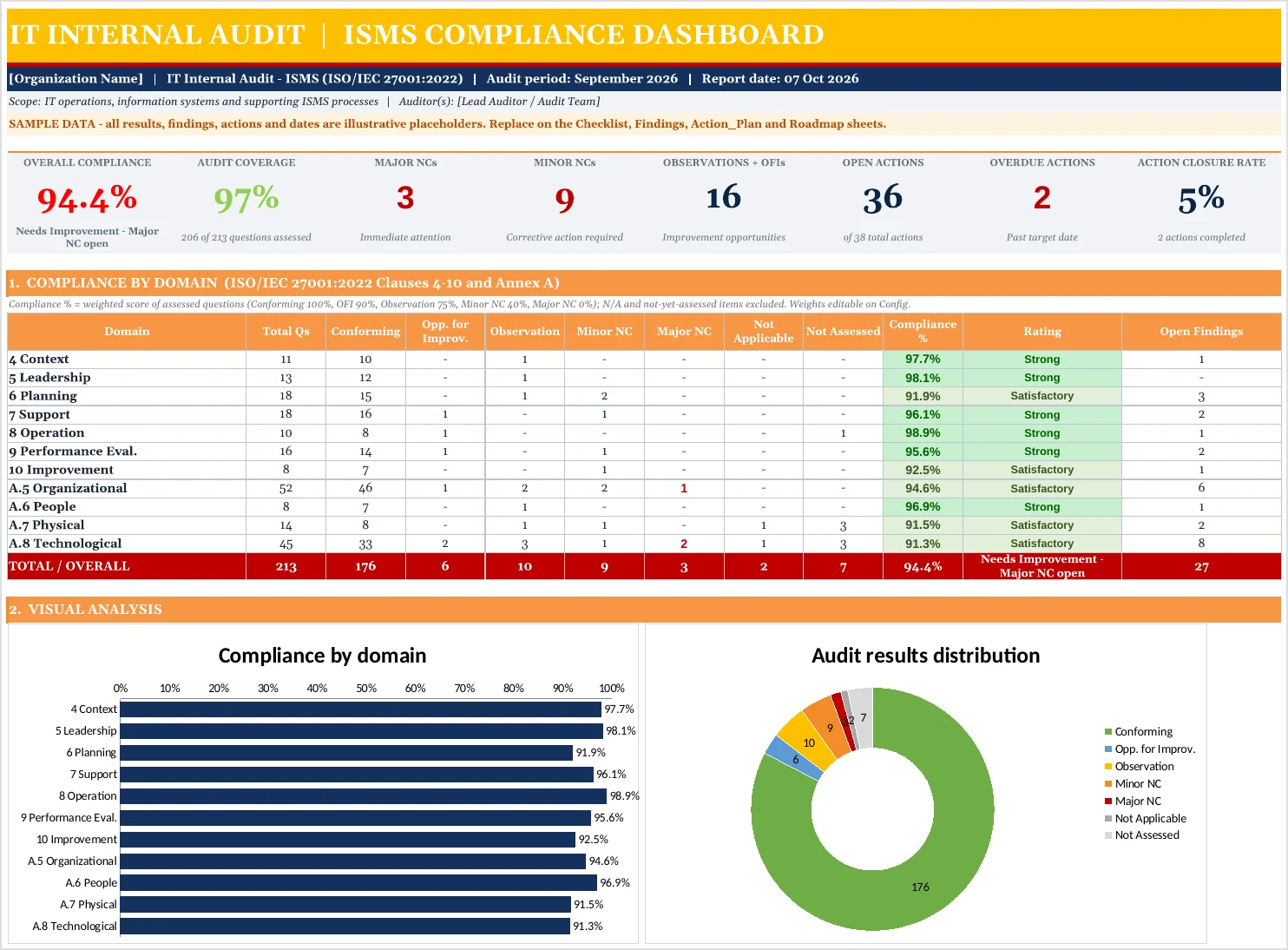
Sample data, included in the workbook to show how the dashboard works.
How the scoring works
Each result carries a weight: Conforming 100%, Opportunity for Improvement 90%, Observation 75%, Minor NC 40% and Major NC 0%. Not Applicable and Not Yet Assessed are excluded. The compliance percentage is the average weighted score of the questions assessed, rated Strong (95% and above), Satisfactory (85% and above), Needs Improvement (70% and above) or Critical. One rule matters in practice: any open major nonconformity caps the overall rating at Needs Improvement, however high the percentage. A 94% score with a major NC open is not a pass, and the dashboard says so.
Risk on each finding is likelihood × impact on a 1 to 25 scale: Low 1–5, Medium 6–11, High 12–19 and Critical 20–25. All thresholds are editable on the Config sheet.
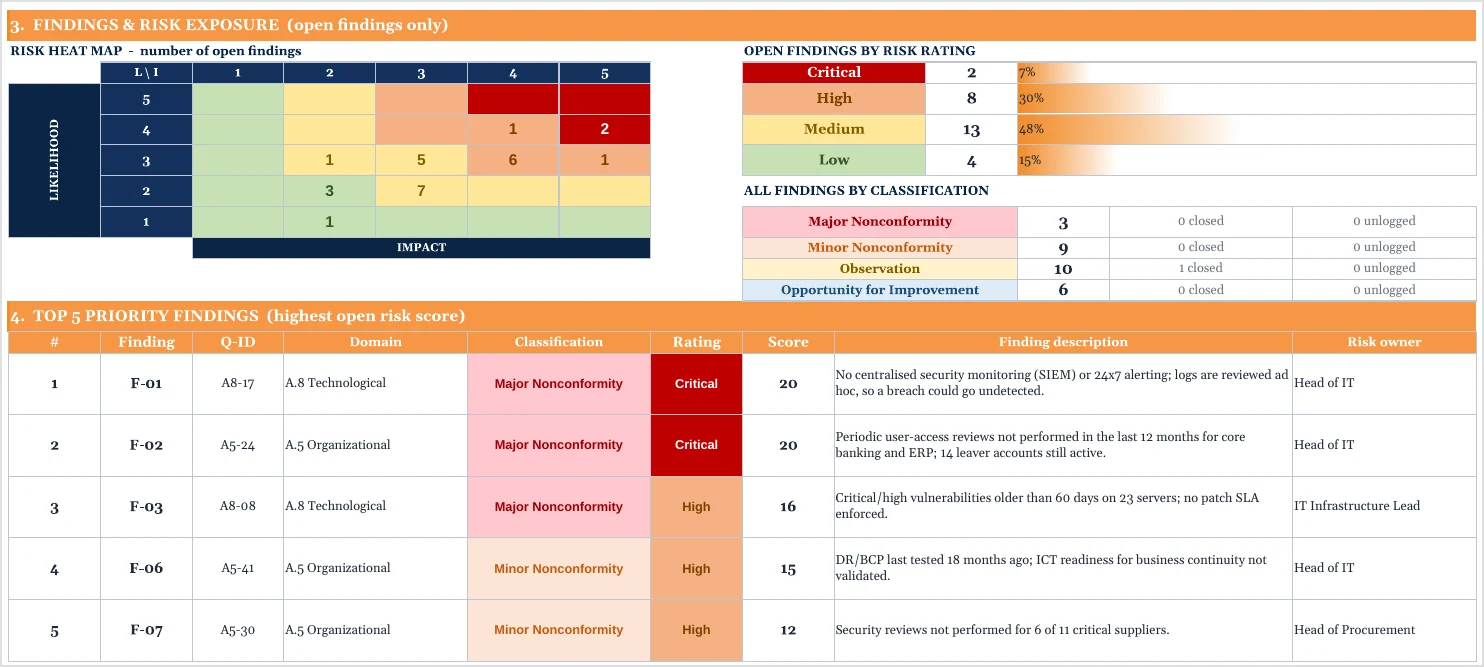
What you get from it
Eight KPIs: overall compliance, audit coverage, major NCs, minor NCs, observations plus OFIs, open actions, overdue actions and action closure rate.
Compliance by domain for clauses 4 to 10 and the four Annex A themes, with a bar chart and a results distribution chart.
A 5×5 risk heat map of open findings and the top five priority findings by risk score, with their risk owners.
Action status by stage, by timeliness (overdue, due in 30 days, on track) and by priority.
A roadmap summary per phase with initiatives, progress and effort in person-days.
Key messages for top management, written by formulas: overall compliance, the weakest and strongest domains, open critical and high findings, action status and the decisions being requested. That last block gives you most of the input for the audit-results part of the clause 9.3 management review.
Software-like features you get without a subscription
Feature you would expect from software | How the two workbooks deliver it |
|---|---|
Live dashboards | Every KPI, chart and table is a formula; nothing is typed on the dashboards |
Status workflow | Fixed dropdowns for status, result, priority, phase and effectiveness |
Automatic prioritisation | Attention queue (tracker) and top-five findings by risk score (audit dashboard) |
Deadline monitoring | Overdue, due-soon and on-track flags calculated from the report date |
Linked records | Findings pull from checklist questions; actions pull from findings |
Configurable scoring | Editable status credits, result weights, risk thresholds and rating bands |
Executive reporting | A management signal line and formula-written key messages |
Ownership tracking | Owner grid, unassigned-control count and risk owners on findings |
What they do not do: collect evidence automatically, send e-mail reminders or keep a field-level audit trail. If you store the files in SharePoint, OneDrive or Google Drive, version history covers most of the audit-trail need.
Which option fits your ISMS?
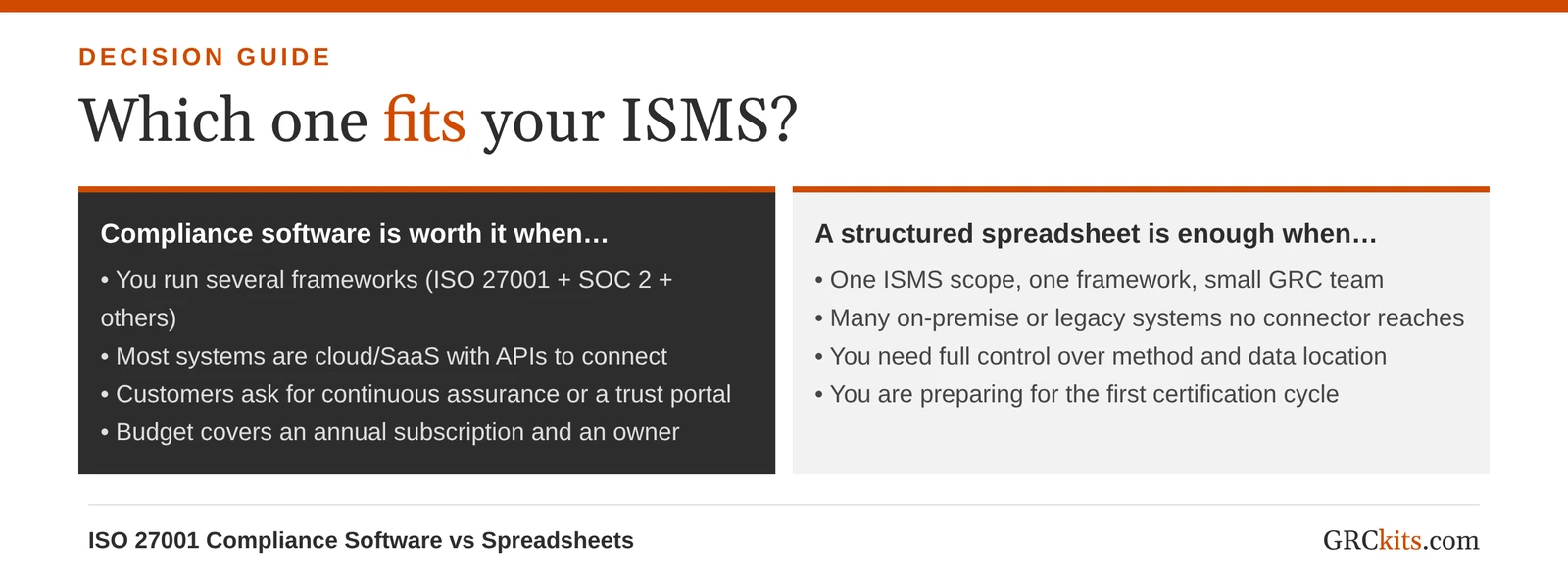
Choose compliance software when:
you run several frameworks at once, such as ISO 27001 plus SOC 2;
most of your systems are cloud or SaaS with APIs a platform can connect to;
customers expect continuous assurance or a trust page;
you have budget for an annual subscription and someone to own the platform.
A structured spreadsheet is enough when:
you have one ISMS scope, one framework and a small GRC team;
many systems are on-premise or legacy, so connectors would cover little;
you want full control over your method and where your data sits;
you are preparing for your first certification audit and want to learn the controls before automating them.
Your risk assessment decides which controls are in scope. If you need one, pair the two workbooks with the ISO 27001 Risk Assessment & Risk Register Dashboard, or take the complete ISO 27001 Full Assessment Toolkit. If you would rather have someone run the implementation with you, see the ISMS and ISO 27001 implementation service.
Many organisations start in Excel and move to a platform once the ISMS is stable and the framework count grows. Starting with a structured workbook is not wasted effort: the ownership, evidence references and SoA justifications you build there transfer directly into any platform later.
Common mistakes when tracking ISO 27001 audit progress
Counting "implemented" as "effective". Keep a separate Verified status and only use it once evidence has been checked.
Tracking Annex A but ignoring clauses 4 to 10. Certification needs the management system clauses met, not just the controls.
Leaving controls without an owner. An unowned control does not progress, and auditors notice.
Free-text status values. If a status cannot be counted, it cannot be reported.
Closing actions without an effectiveness check. Clause 10.2 asks you to review whether the corrective action worked, not just whether it was done.
Reporting raw sheets to management. Give them the one-page view and the decisions you need.
Treating self-reported progress as evidence. Status from control owners is a management indicator until evidence backs it.
Frequently asked questions
Is ISO 27001 compliance software required for certification?
No. ISO/IEC 27001:2022 requires documented information and evidence that the ISMS works, not any specific tool. Certification bodies audit your processes and records, whether they sit in a platform, in spreadsheets or in documents.
Can I manage ISO 27001 with spreadsheets?
Yes, if the spreadsheet is structured: fixed statuses, owners, target dates, evidence references and dashboards driven by formulas. Unstructured sheets with free-text status are where spreadsheet tracking usually breaks down.
What should an ISO 27001 internal audit dashboard include?
At minimum, it needs overall compliance or implementation against a target, and results by clause and Annex A theme. Add counts of major and minor nonconformities and open findings by risk rating. Finish with action status, overdue items and a short summary of the decisions needed from management.
What is the difference between a nonconformity, an observation and an OFI?
A nonconformity is a failure to meet a requirement. It is major when the requirement is not met at all or the failure undermines the ISMS. It is minor when it is an isolated lapse. An observation is a weakness that could become a nonconformity. An opportunity for improvement (OFI) is a suggestion where the requirement is already met. Exact definitions vary between certification bodies and audit methods.
How often should ISO 27001 internal audits be done?
Clause 9.2 requires audits at planned intervals but does not fix a frequency. Certification bodies generally expect the full ISMS scope to be covered within the three-year certification cycle. Many organisations audit the whole scope every year and audit higher-risk areas more often.
Do the GRCkits tools work in Google Sheets?
Both are built for Microsoft Excel. Most formulas work in other spreadsheet apps, but charts, conditional formatting and some functions may display differently, so Excel is recommended.
Conclusion
The choice between ISO 27001 compliance software and spreadsheets comes down to scope, systems and budget, not to which option looks more modern. Software earns its subscription when evidence can be collected automatically across many cloud systems and frameworks. A structured spreadsheet does the job when your scope is focused and your evidence is collected by people anyway.
Both must deliver the same things. You need controls with owners and evidence, and an audit that produces graded findings. You also need corrective actions that close on time, and a one-page view that tells management what to decide. If you want to start that loop today, track implementation with the ISO 27001:2022 Control Implementation Tracker and run your internal audit in the ISO 27001 IT Internal Audit Dashboard.

Written by
Shahidul Shubo
Cybersecurity GRC Consultant
Shahidul Shubo is a Cybersecurity GRC Consultant with 10+ years of experience in information security governance, risk management, regulatory compliance and IT audit, and has audited more than 120 organisations. He is CISA and CISM certified, an ISO/IEC 27001 Lead Auditor and Lead Implementer, and a Lead Auditor for ISO/IEC 27701, ISO/IEC 42001, ISO 22301 and ISO 9001. His technical credentials include AWS Solutions Architect, AWS Security Specialty, Red Hat RHCA and RHCE, Fortinet NSE and CCEP. He works hands-on with ISO 27001, NIST CSF and NCA ECC, and builds the practical templates and assessment tools published on GRCkits.
Connect on LinkedInNeed hands-on help?
Information Security Management System (ISMS)
Design, implement and certify an ISO/IEC 27001 ISMS that protects the confidentiality, integrity and availability of your information.
Request a quote