Databases hold the data attackers are after: customer records, payment data, credentials and financial transactions. Yet in many audits the database is treated as a black box behind the application. A database security assessment opens that box and checks, with evidence, whether the controls around the database actually protect what is inside it.
This guide is written for IT auditors and GRC professionals. It covers what to test, what evidence to request, how to rate what you find, and the mistakes that weaken database audits.
In short: A database security assessment is a structured review of whether a database's access, authentication, logging, encryption, patching, configuration and backup controls are well designed and working as intended, based on evidence taken from the database itself rather than from policy documents.
From the field: Most of the database audits I do are on Oracle and Microsoft SQL Server, so the examples in this guide use both. The same control areas apply to MySQL, PostgreSQL and cloud-managed databases.
What a Database Security Assessment Covers
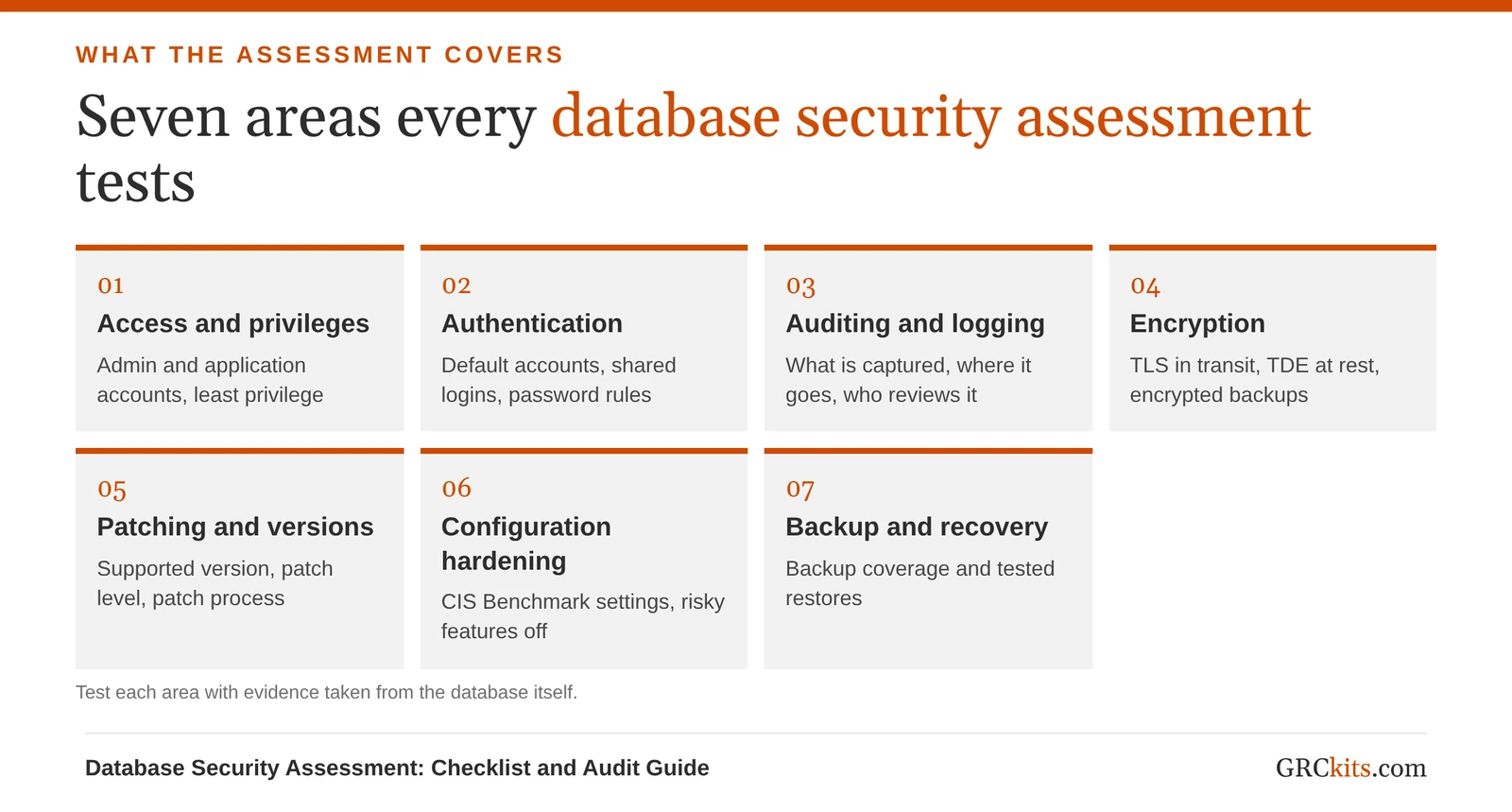
A complete assessment looks at seven control areas:
Access and privileges: who can connect, and who holds administrative rights.
Authentication: default and shared accounts, password rules and how users log in.
Auditing and logging: what the database records, where logs go and who reviews them.
Encryption: protection of data in transit, at rest and in backups.
Patching and versions: whether the database version is supported and patched.
Configuration hardening: whether settings match a secure baseline.
Backup and recovery: whether data can actually be restored within the required time.
Before You Start: Scope and Criteria
Start with an inventory of database instances: production, disaster recovery, and any non-production copies that contain real data. Rank them by the sensitivity of the data they hold and the business processes they support, and focus the deepest testing on the highest-risk instances.
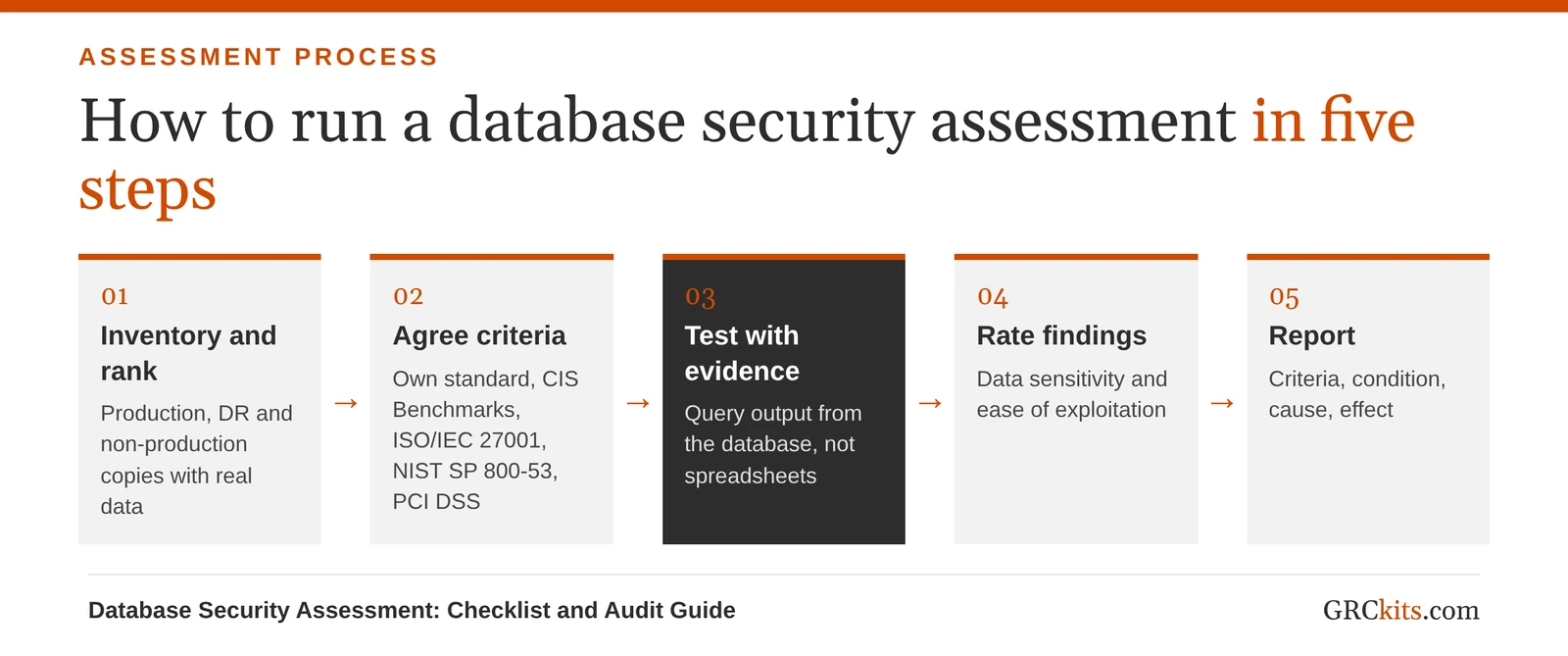
Then agree the criteria you will test against. Typical sources are:
The organization's own database security standard or hardening policy.
The CIS Benchmarks for the specific database product and version.
ISO/IEC 27001:2022 Annex A controls, such as 8.2 (privileged access rights), 8.5 (secure authentication), 8.15 (logging) and 8.24 (use of cryptography).
NIST SP 800-53 Rev. 5 controls, where the organization uses them.
PCI DSS, if the database stores, processes or transmits cardholder data.
How to Assess Database Security: What to Test and What Evidence to Collect
1. Access and privileges
Get the list of accounts with administrative rights directly from the database, not from a spreadsheet. In Oracle, that means users granted the DBA role (for example from DBA_ROLE_PRIVS). In SQL Server, it means members of the sysadmin fixed server role. Compare the list with the approved list of administrators, and check that application service accounts have only the rights the application needs.
Evidence: query output with the date and instance name visible, the approved administrator list, and records of the most recent periodic access review.
2. Authentication
Check that default accounts are locked or disabled (for example, the sa login in SQL Server), that shared administrator logins are not used, and that password rules are enforced by the database. In Oracle these are set through profiles; in SQL Server, SQL logins should have password policy enforcement switched on, or the organization should use Windows or directory-based authentication.
Evidence: account status listings, profile or login policy settings, and a list of any exceptions with their approvals.
3. Auditing and logging
Confirm that database auditing is switched on and that it captures what matters: privileged actions, failed logins, changes to users and permissions, schema changes, and access to sensitive tables. Oracle offers unified auditing; SQL Server offers SQL Server Audit. Then check where the logs go. Logs that stay on the database server can be altered by the administrators they are meant to monitor, so they should be forwarded to a central log platform or SIEM and reviewed.
Evidence: the audit configuration, a sample of recent audit records, the log-forwarding setup, and records showing that someone reviews the alerts.
From the field: The finding I raise most often in database audits is that auditing is not enabled, or that it is enabled but nobody reviews the logs and they never reach the SIEM. Without it, nobody can show what a privileged user did, which is exactly the question that matters after an incident.
4. Encryption
Check three things: whether connections to the database are encrypted in transit (TLS), whether sensitive databases are encrypted at rest, for example with Transparent Data Encryption (TDE), which both Oracle and SQL Server offer, and whether backup files are encrypted too. Then ask who manages the encryption keys and where they are stored.
Evidence: connection encryption settings, the encryption status of each in-scope database, backup encryption settings, and the key management procedure.
5. Patching and versions
Record the exact version and patch level of each instance and compare them with the vendor's support status and latest security updates. Oracle releases Critical Patch Updates on a quarterly schedule; Microsoft releases cumulative updates and security updates for SQL Server. A database version that is out of vendor support is a finding in its own right.
Evidence: version output from each instance, the patch history, and the organization's patching policy and timelines.
6. Configuration hardening
Compare the database configuration with the agreed baseline, usually a CIS Benchmark. Typical checks include unnecessary features and sample schemas removed, and risky options disabled; for example, the CIS Benchmark for SQL Server recommends keeping xp_cmdshell disabled. Automated configuration scans help, but confirm that the scan covered every in-scope instance.
Evidence: configuration scan results or setting exports, the approved baseline, and approved exceptions.
7. Backup and recovery
Review backup schedules, retention, and where copies are stored, including at least one copy that is offline or immutable. Then ask for evidence of a restore test. A backup that has never been restored is an assumption, not a control. Compare the actual restore time with the recovery time objective (RTO) agreed for the business process.
Evidence: backup job history, storage locations, the latest restore test record with date, result and time taken, and the agreed RPO and RTO.
From the field: In backup reviews, the gap I see most often is that backups run every night but restores are never tested. The job history looks perfect, and nobody knows whether the data can actually be recovered, or how long it would take.
Example Evidence Queries for Oracle, SQL Server, MySQL and PostgreSQL
Evidence is strongest when it comes straight from the database. The queries below are common starting points for the checks above. Run them with a read-only account, keep the output with the instance name and date, and confirm the syntax for your exact version, because system views change between releases.
Check | Oracle | SQL Server | MySQL | PostgreSQL |
|---|---|---|---|---|
Privileged accounts |
|
|
|
|
Version and patch level |
|
|
|
|
Encryption in transit |
|
|
|
|
Auditing enabled |
|
|
|
|
Default and admin logins |
|
|
|
|
MySQL Community Edition does not include an audit plugin by default, so an empty result there is itself a finding to discuss. In PostgreSQL, also check that no trust entries appear in the authentication rules for remote connections.
Database Security Assessment Checklist
Use this table as a starting point for your test program:
Control area | What to test | Evidence to request |
|---|---|---|
Privileged access | Administrator accounts match the approved list; application accounts have least privilege | Role membership query output; approved admin list; access review records |
Authentication | Default accounts disabled; no shared admin logins; password rules enforced | Account status list; profile or login policy settings |
Auditing and logging | Auditing enabled for key events; logs sent to SIEM and reviewed | Audit configuration; sample audit records; review evidence |
Encryption | TLS in transit; encryption at rest for sensitive data; encrypted backups | Encryption settings; key management procedure |
Patching | Supported version; security patches applied within policy timelines | Version output; patch history; patching policy |
Configuration | Settings match the CIS Benchmark or internal baseline | Scan results; configuration export; approved exceptions |
Backup and recovery | Backups complete; offline or immutable copy; restore tested within RTO | Job history; restore test record; RPO and RTO |
Free download: the Database Security Assessment Checklist (Excel sample) turns this table into a working file. It has 28 checks across the seven control areas, a result and rating drop-down for each, the example queries above, and a summary sheet that calculates results by area. The sample is filled in for a fictional database so you can see what good evidence and findings look like.
Rating and Reporting Findings
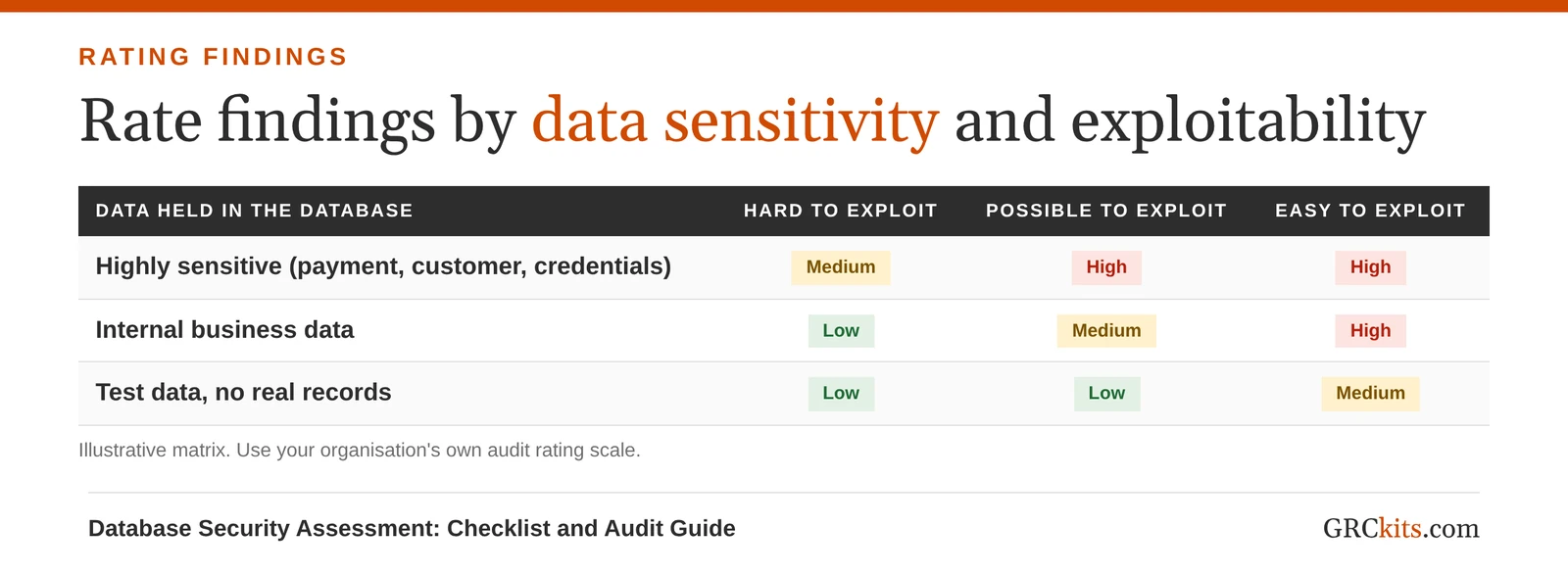
Write each finding with criteria, condition, cause and effect, as explained in how internal audit works. Rate it by the sensitivity of the data involved and how easily the weakness could be exploited. A missing audit log on a database of customer payment data deserves a higher rating than the same gap on a test database with no real data.
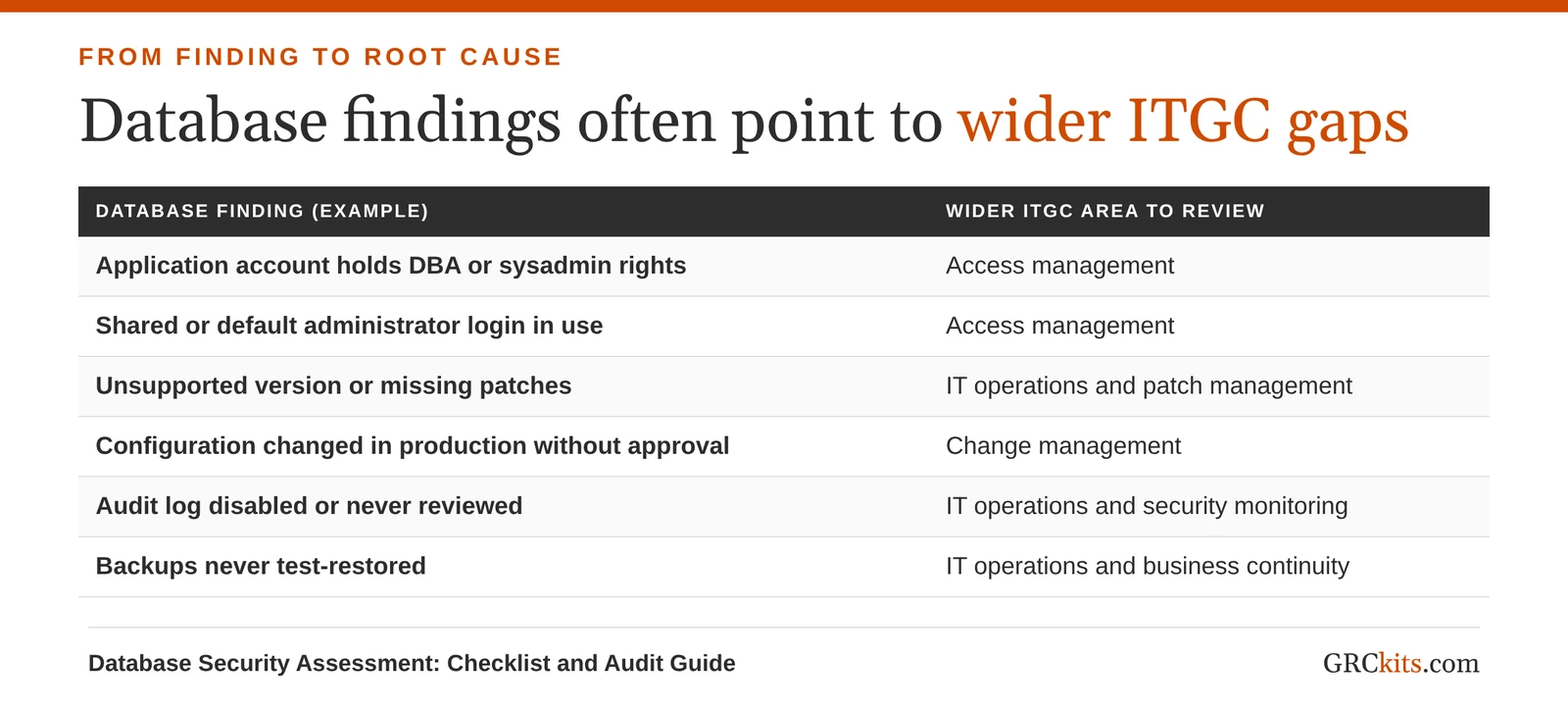
Database findings often point to wider ITGC weaknesses in access management, change management or IT operations. Where they do, say so, because the fix usually belongs to a process, not to a single database. If database risk keeps showing up, it also belongs in the next risk-based internal audit plan. If you track open findings as risks, the risk register template shows how to score and follow them up.
Common Mistakes in Database Security Audits
Accepting screenshots instead of system output. Ask for query results or exports that show the instance name and date, or watch the queries being run.
Testing only production. Non-production copies that hold real data are often less protected and still in scope.
Accepting "auditing is on" at face value. Check what is captured, where it goes and whether anyone reviews it.
Treating a backup job as proof of recovery. Only a restore test proves the data can come back.
Letting the DBA be the only reviewer. Administrators hold the privileges being reviewed, so access and log reviews need independent oversight.
Notes From the Field: What Database Audits Commonly Find
The author of this guide, Shahidul Shubo, has audited more than 120 organisations across IT, information security and ISO/IEC 27001 engagements. In database reviews, four findings come up again and again. Each one is easy to test for and easy to miss if you rely on documents instead of system output.
1. Application accounts with DBA or sysadmin rights
The service account an application uses to connect is often a member of the DBA role in Oracle or the sysadmin role in SQL Server, usually because it was the quickest way to make an installation work. The risk is that any flaw in the application, such as SQL injection, then gives an attacker full control of the database. Test it by listing role members from the database and checking every service account against what the application actually needs.
2. Default and shared administrator logins
Built-in accounts such as sa or SYSTEM, or one administrator login shared by the whole DBA team, remain in daily use. Even where auditing is on, the log then shows only the shared name, so no action can be traced to a person. Ask for named administrator accounts and disabled or tightly controlled default accounts.
3. Audit logging switched off or never reviewed
Sometimes database auditing is not enabled at all. Other times it is enabled, but the logs stay on the database server, nobody reviews them, and the DBAs who are being monitored can change or delete them. Check what is captured, where the logs are sent and who reviews them independently.
4. Unsupported versions and missing patches
Databases often stay on old versions because an application depends on them, and some run past the end of vendor support. Compare the version and patch level with the vendor lifecycle and the latest security update. Where an upgrade is not possible yet, look for a dated upgrade plan and compensating controls, and record the exposure as a risk in the risk register rather than leaving it as an undocumented exception.
A Tool to Structure the Assessment
To run this assessment in a consistent way, the Database Security Assessment Dashboard gives you a structured control checklist and a dashboard to record results and findings. For a quick self-check before a full audit, you can also try the free online database security audit tool. For a broader review beyond databases, the Cybersecurity Assessment Dashboard covers 131 controls across 17 domains, mapped to ISO/IEC 27001:2022 and NIST CSF 2.0.
Frequently Asked Questions
How often should database security be assessed?
At least once a year for databases that hold sensitive or regulated data, and again after major changes such as upgrades, migrations or new privileged access. Automated configuration checks can run more often between full assessments.
What is the difference between a database security assessment and a vulnerability scan?
A vulnerability scan automatically looks for known weaknesses and misconfigurations. An assessment also tests process controls that a scan cannot see, such as access reviews, log review and restore testing, and it is based on evidence and criteria.
Which standards apply to database security?
CIS Benchmarks are the most common configuration baseline. ISO/IEC 27001:2022 Annex A and NIST SP 800-53 provide control requirements, and PCI DSS applies where cardholder data is stored or processed. Many organizations also have their own database security standard.
Can the DBA assess their own database?
A DBA self-assessment is useful for finding gaps early, but it is not independent. DBAs hold the privileges under review, so an independent party should test access, logging and segregation of duties.
What evidence is acceptable in a database audit?
System-generated output is strongest: query results, configuration exports, audit records and job histories that show the instance name and date. Policy documents show intent, not operation, so they are not enough on their own.
Conclusion
A database security assessment tests seven control areas with evidence taken from the database itself: access, authentication, logging, encryption, patching, configuration and backups. Start with the highest-risk instances, test against clear criteria, and report findings in business terms. If you are building these skills, the IT audit career guide shows how database testing fits into ITGC work.
Want a quick first view of your own database? Run the free online database security audit tool, then use the checklist above for a full, evidence-based review.
Downloads

Written by
Shahidul Shubo
Cybersecurity GRC Consultant
Shahidul Shubo is a Cybersecurity GRC Consultant with 10+ years of experience in information security governance, risk management, regulatory compliance and IT audit, and has audited more than 120 organisations. He is CISA and CISM certified, an ISO/IEC 27001 Lead Auditor and Lead Implementer, and a Lead Auditor for ISO/IEC 27701, ISO/IEC 42001, ISO 22301 and ISO 9001. His technical credentials include AWS Solutions Architect, AWS Security Specialty, Red Hat RHCA and RHCE, Fortinet NSE and CCEP. He works hands-on with ISO 27001, NIST CSF and NCA ECC, and builds the practical templates and assessment tools published on GRCkits.
Connect on LinkedInNeed hands-on help?
IS Audit
Independent information systems audits that strengthen IT governance and demonstrate compliance.
Request an audit